Serial Number (SN) Management in BigSeller
Copy link & title
Update Time: 30 May 2026 07:47
BigSeller now offers Serial Number (SN) management, giving sellers of high-value products — such as consumer electronics and home appliances — full end-to-end traceability at the individual unit level.
The feature covers every stage of the inventory lifecycle and helps sellers quickly produce evidence in after-sales disputes, quality investigations, and compliance reviews, significantly reducing operational risk.
Why Do Sellers Need Serial Number Management?
High-value product sellers often struggle to verify item origins during returns, pinpoint affected units in batch quality issues, or provide documented proof in compliance reviews and disputes. These gaps lead to unnecessary costs and operational risk.
Once Serial Number management is enabled, each unit is assigned a unique SN code, making the full journey from inbound to outbound fully traceable.
The feature covers every stage of the inventory lifecycle and helps sellers quickly produce evidence in after-sales disputes, quality investigations, and compliance reviews, significantly reducing operational risk.
Why Do Sellers Need Serial Number Management?
High-value product sellers often struggle to verify item origins during returns, pinpoint affected units in batch quality issues, or provide documented proof in compliance reviews and disputes. These gaps lead to unnecessary costs and operational risk.
Once Serial Number management is enabled, each unit is assigned a unique SN code, making the full journey from inbound to outbound fully traceable.
Key Concepts
Before enabling Serial Number management, familiarise yourself with the following:
- Serial Number (SN): A unique identifier (Serial Number) assigned to an individual unit to precisely identify and track the item throughout its entire lifecycle.
Serial number statuses:
- In Stock: The item has been received into inventory. The serial number is bound to a SKU and available for outbound use.
- Stocked-Out: The item has been shipped or stocked. The serial number is bound to the corresponding stock-out record.
Serial numbers support two item conditions: Good and Defective. For more on defective stock management, refer to the relevant help article: .
How to Enable Serial Number Management
Serial Number management is a VIP-exclusive feature and must be enabled at two levels:
1. Global Switch
Path: Settings > Inventory Settings > Serial Number (SN) Management
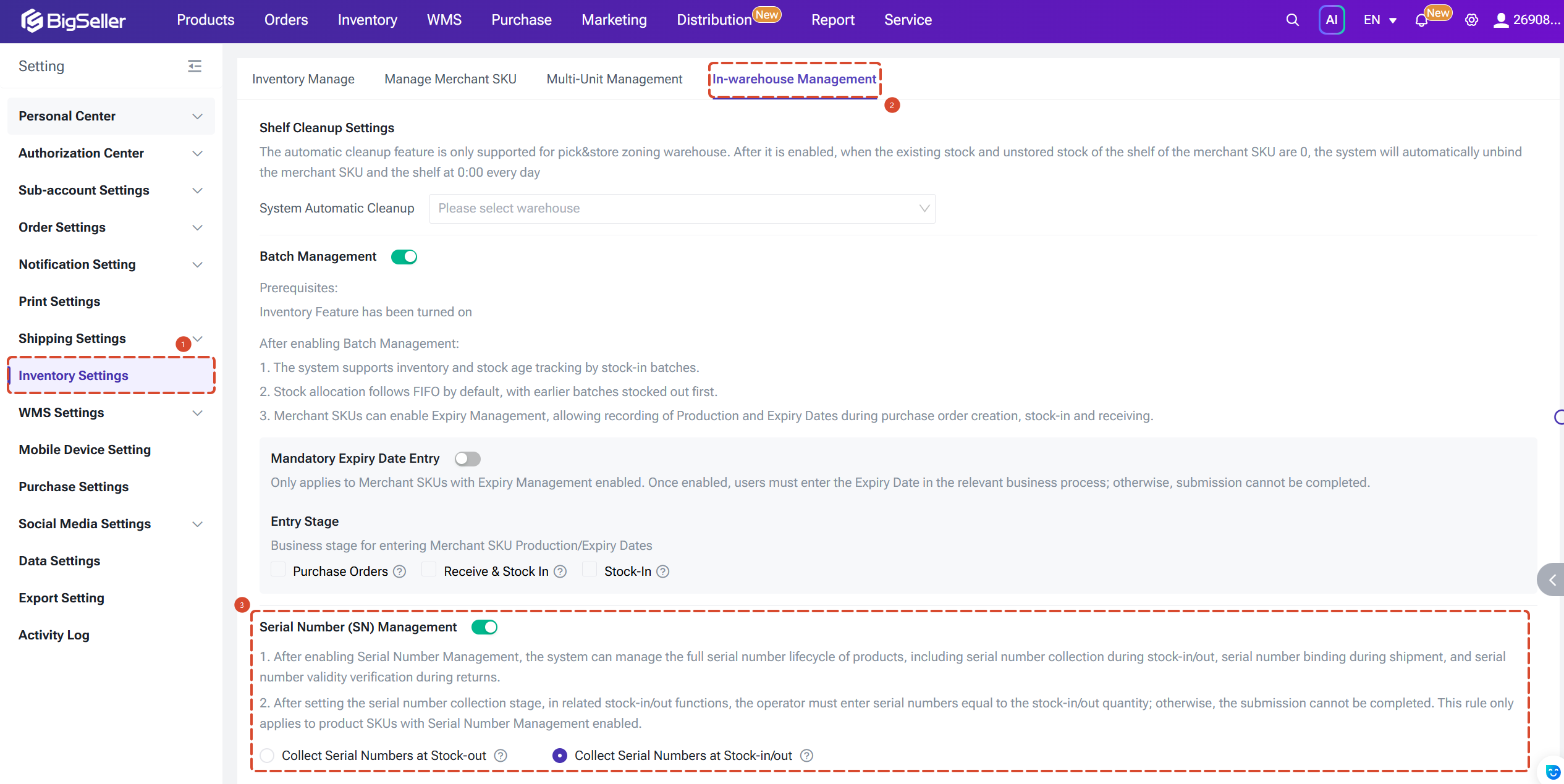
2. SKU-Level Switch
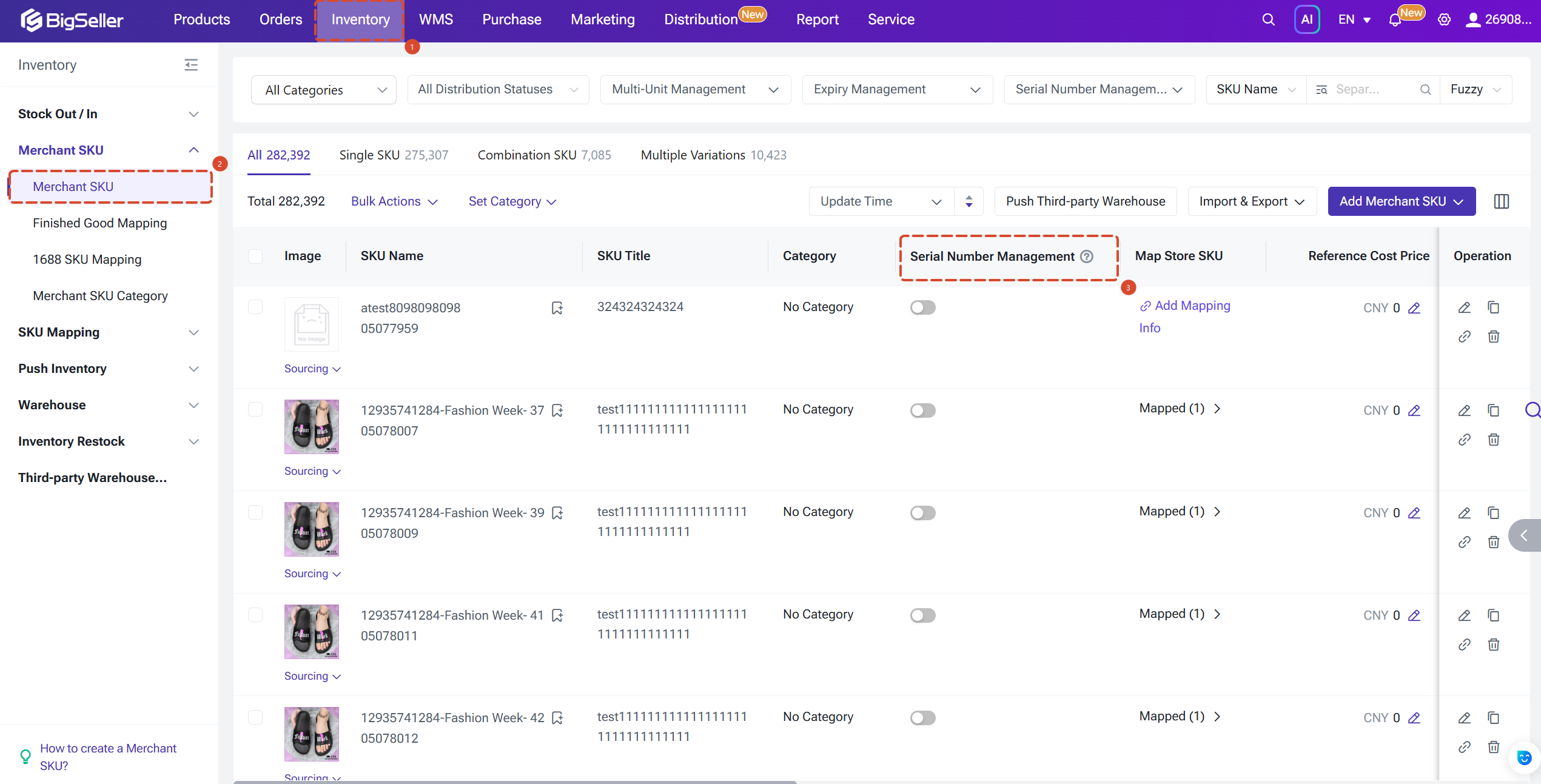
After enabling the global switch, Serial Number management must be turned on individually for each SKU. You can do this via:
1. Global Switch
Path: Settings > Inventory Settings > Serial Number (SN) Management
2. SKU-Level Switch
After enabling the global switch, Serial Number management must be turned on individually for each SKU. You can do this via:
- Inventory > Merchant SKU List > Single/Bulk Action > Enable/Disable Serial Number Management
- Edit Merchant SKU > Basic Info > Serial Number Management
- Import (Create/Update) SKUs — use the Serial Number Management field to configure in bulk
- Bulk actions are also supported on the SKU list page and the multi-variant edit page
Note: Serial Number management is not supported for combination SKUs.
Two SN Collection Modes
After enabling Serial Number management for a SKU, you must select a collection mode. Two options are available:
1. Collect Serial Numbers at Stock-out (Lightweight Mode)
1. Collect Serial Numbers at Stock-out (Lightweight Mode)
- Serial numbers are recorded only at the time of stock-out. No stock-in registration is required.
- Sellers can look up the corresponding stock-out list by serial number for basic after-sales tracing.
- Best for: Sellers who only need to prevent duplicate shipments and maintain simple after-sales records.

2. Collect Serial Numbers at Stock-in/out (Full Control Mode)
- Serial numbers must be registered at stock-in, and the quantity entered must match the received quantity exactly.
- At stock-out, only serial numbers that are registered and in In Stock status can be selected; the system automatically validates compliance.
- This provides a complete lifecycle record for every serial number, supporting precise inventory management and after-sales verification.
- Best for: Sellers of 3C electronics, home appliances, and other high-value goods requiring strict unit-level traceability.

Serial Number Rules
- Serial numbers support 1–64 characters and may contain letters, numbers, and the following symbols: _ - ( ) # /
- One unit of inventory corresponds to one serial number. The number of in-stock serial numbers for a SKU should equal the current stock quantity (SKU : SN = 1 : N).
- Duplicate serial numbers are not permitted within the same stock-in or stock-out batch.
- Return validation: When processing a return, the system additionally checks that the returned serial number(s) exactly match those bound to the original stocked-out shipment, and that the status of those serial numbers is Stocked-Out. If either condition is not met, the return will fail — effectively preventing swap-out return fraud.
Step by Step Operations
Serial numbers are required only when Serial Number management is enabled for the SKU. When the feature is off, the serial number field is optional and any values entered are saved for reference only.
Note: BigSeller does not currently support printing serial number barcodes. For scanning-enabled stages, sellers must scan the manufacturer's label already affixed to the product.
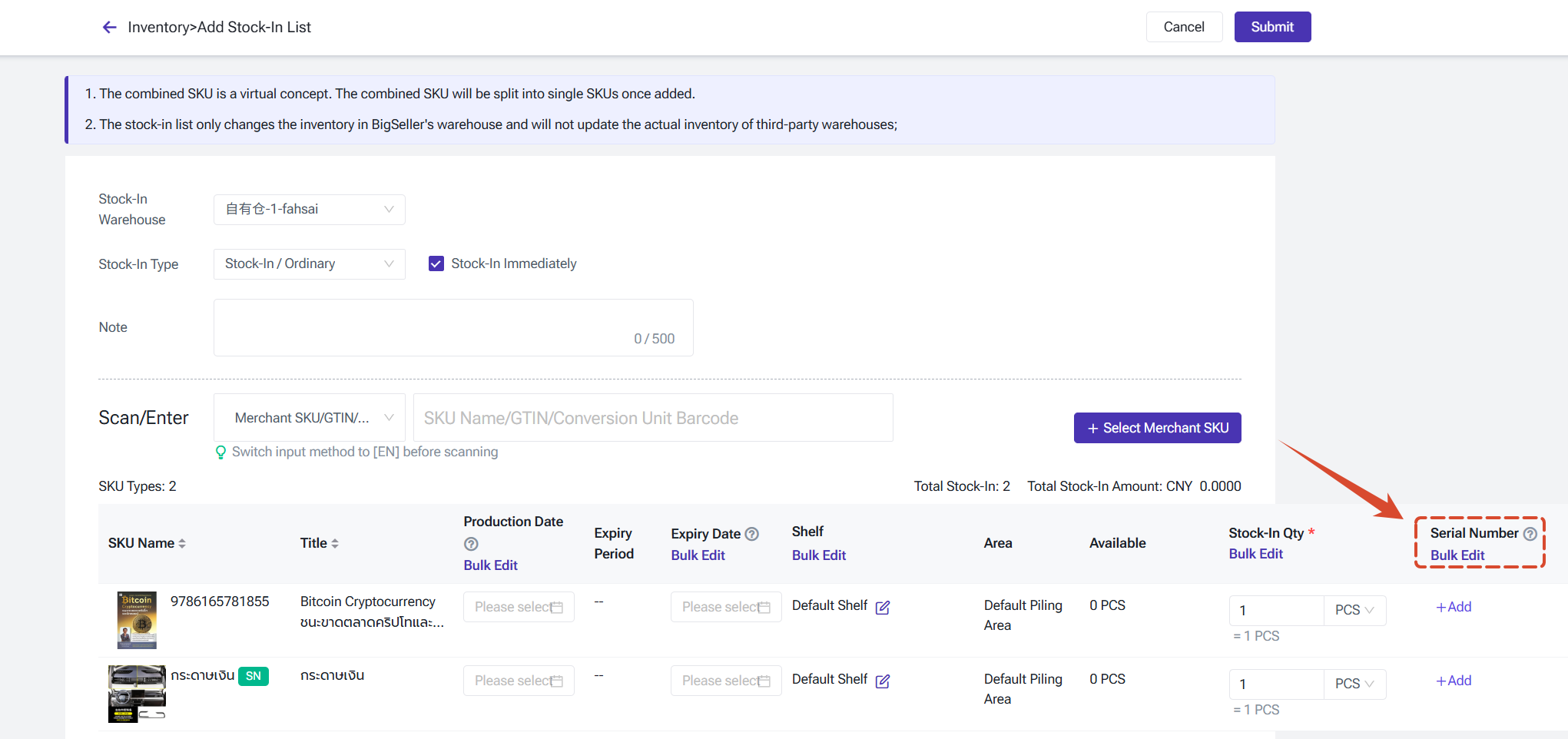
1. Manual Stock-in
When creating or editing a stock-in list, a Serial Number field is added to each SKU row. Supported entry methods:
Note: BigSeller does not currently support printing serial number barcodes. For scanning-enabled stages, sellers must scan the manufacturer's label already affixed to the product.
1. Manual Stock-in
When creating or editing a stock-in list, a Serial Number field is added to each SKU row. Supported entry methods:
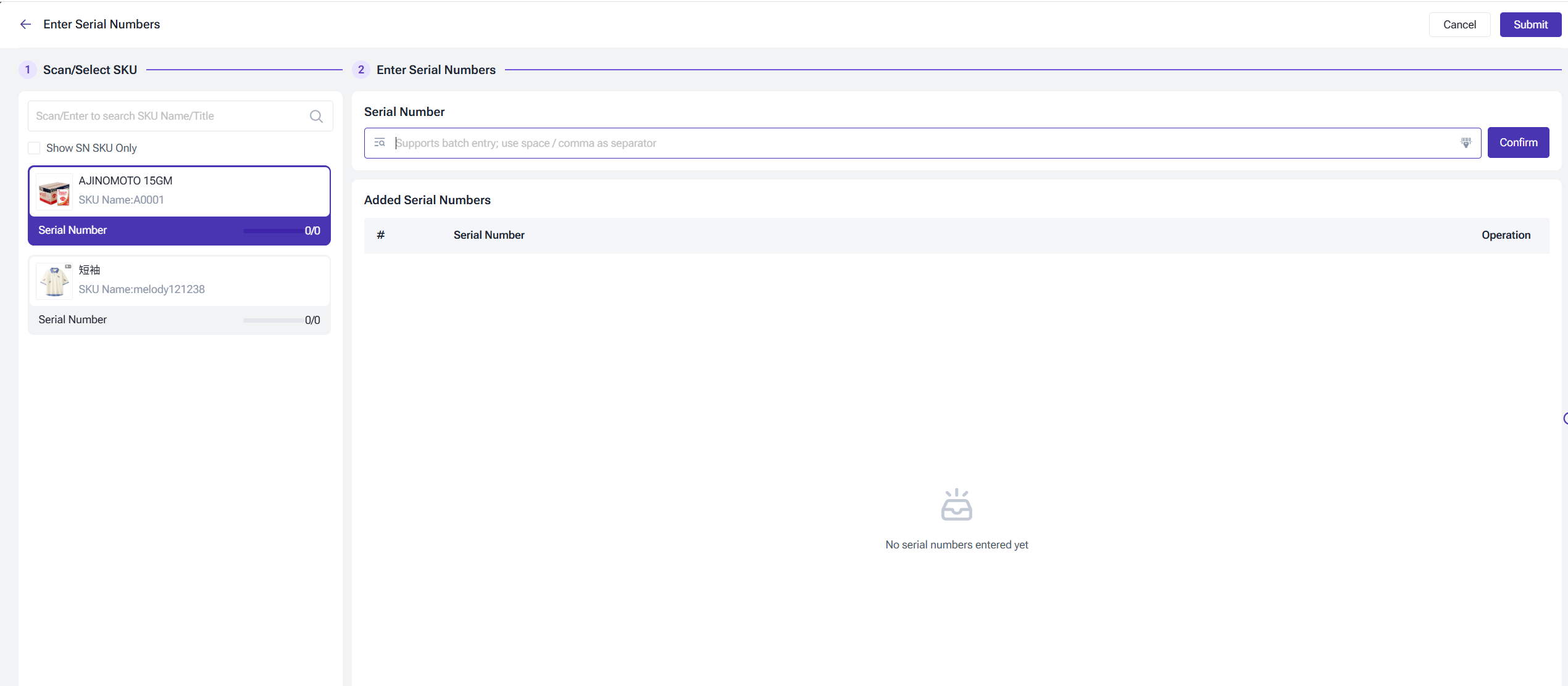
- Individual entry: Scan or manually type each serial number in the SN pop-up window.
- Bulk entry: Enter multiple serial numbers at once.
- Import (edit page only): Download the template, fill it in, and upload it (up to 5,000 rows per file).
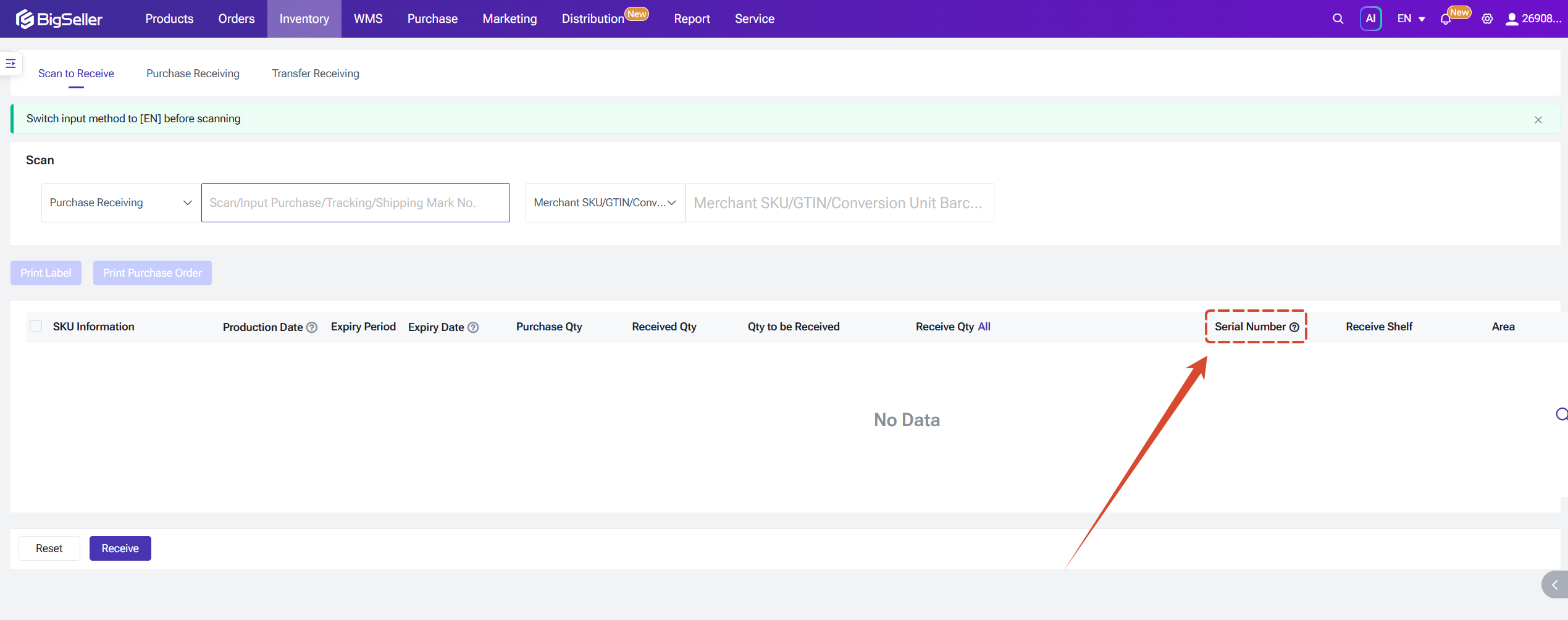
2. Receiving (Scan to Receive / Purchase Receiving / Transfer Receiving)
A Serial Number field is added to each SKU row. Entry methods are the same as for Manual Stock-in.
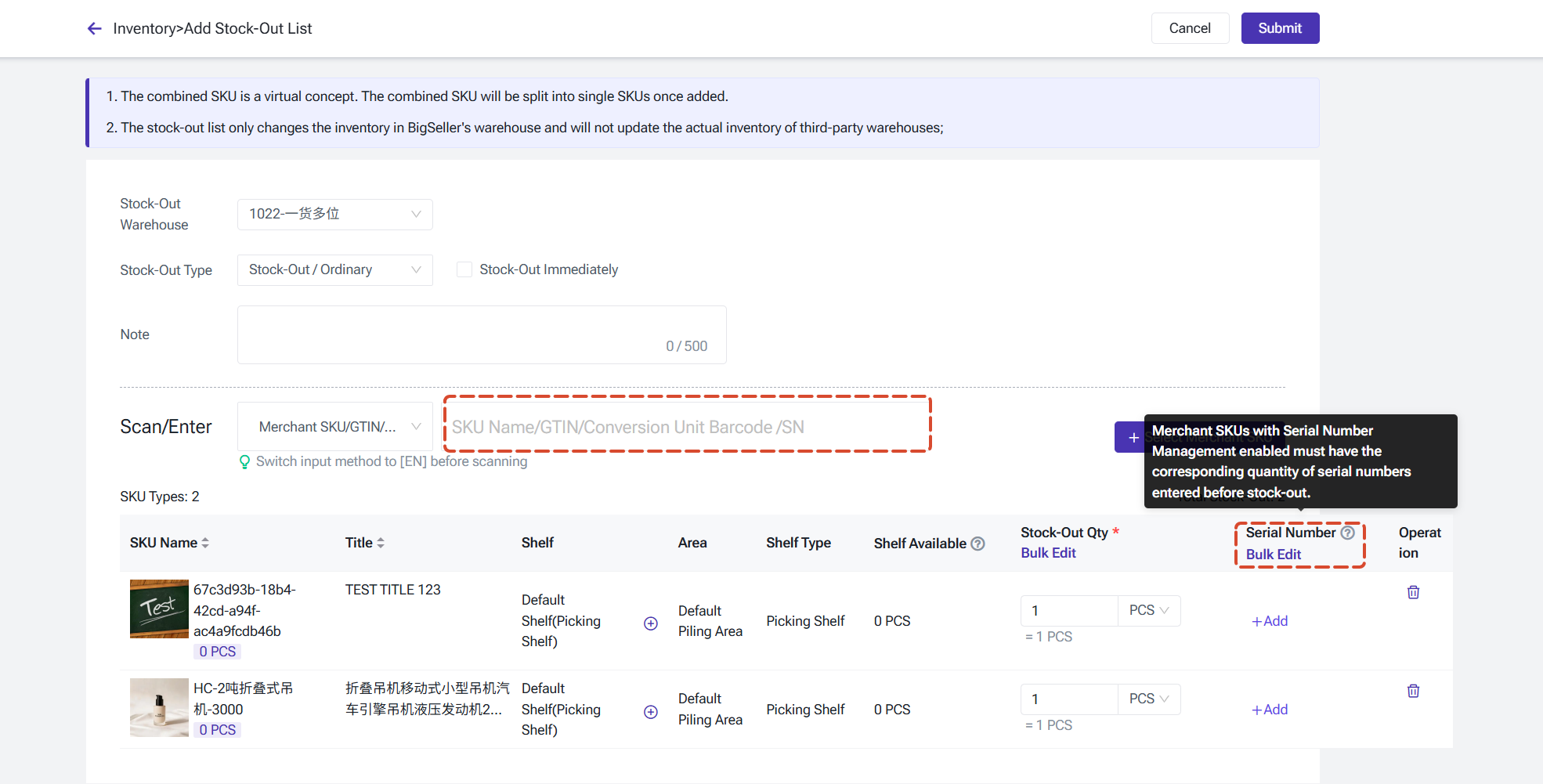
3. Manual Stock-out
When creating or editing an srock-out list, a Serial Number field is added to each SKU row.
Scanning an SN code can automatically match the corresponding SKU. The stock-out edit page also supports Import Serial Numbers. Serial number details can be viewed in both the To Stock-in and Completed states (hover over the SN indicator to expand).
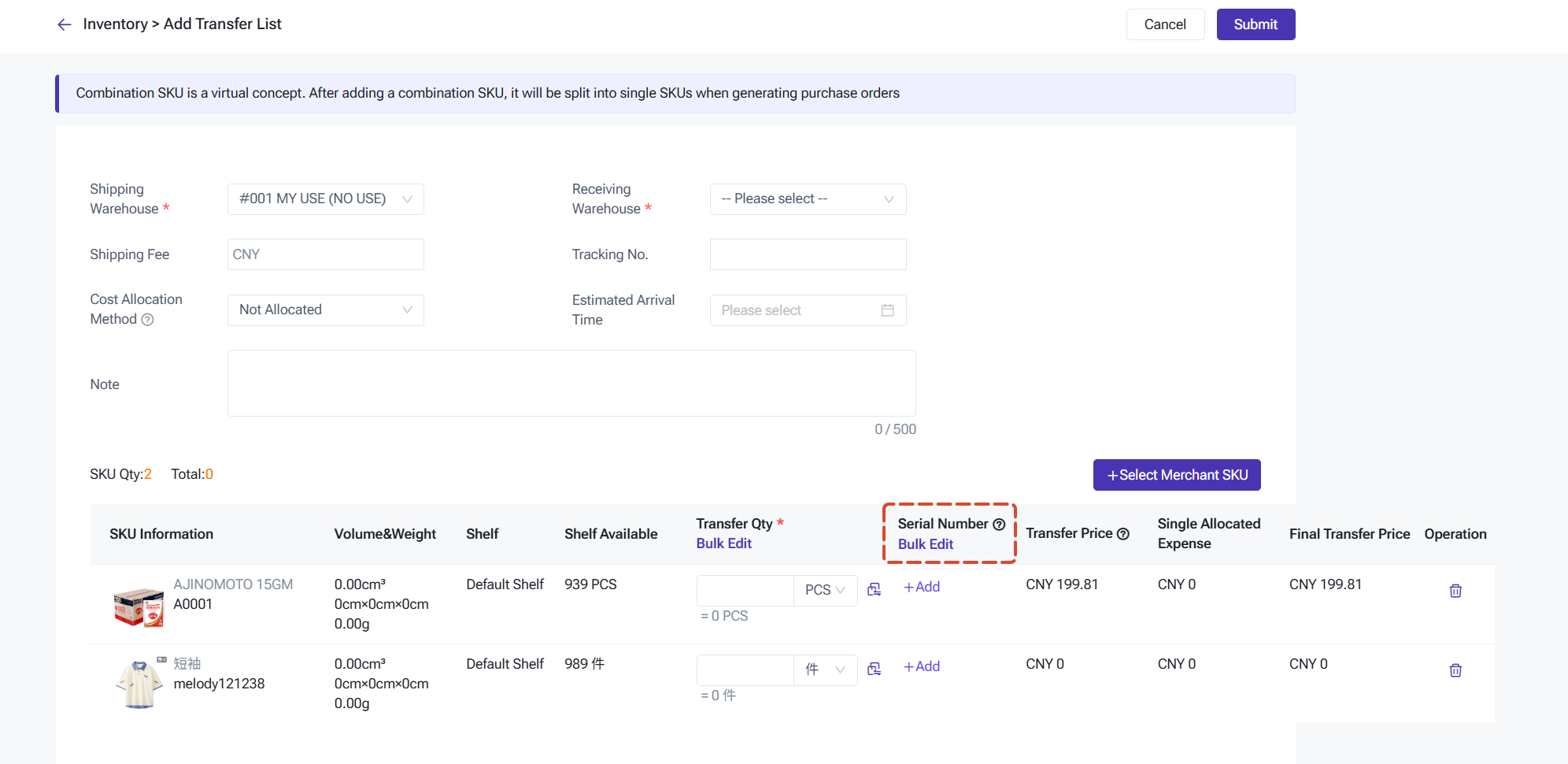
4. Transfer Stock-out
When creating or editing a transfer list, a Serial Number field is added to each SKU row. Serial number validation is triggered when the transfer is dispatched.
Note: Import Serial Numbers is not supported when editing a transfer order, to prevent data conflicts caused by simultaneous editing by multiple users.
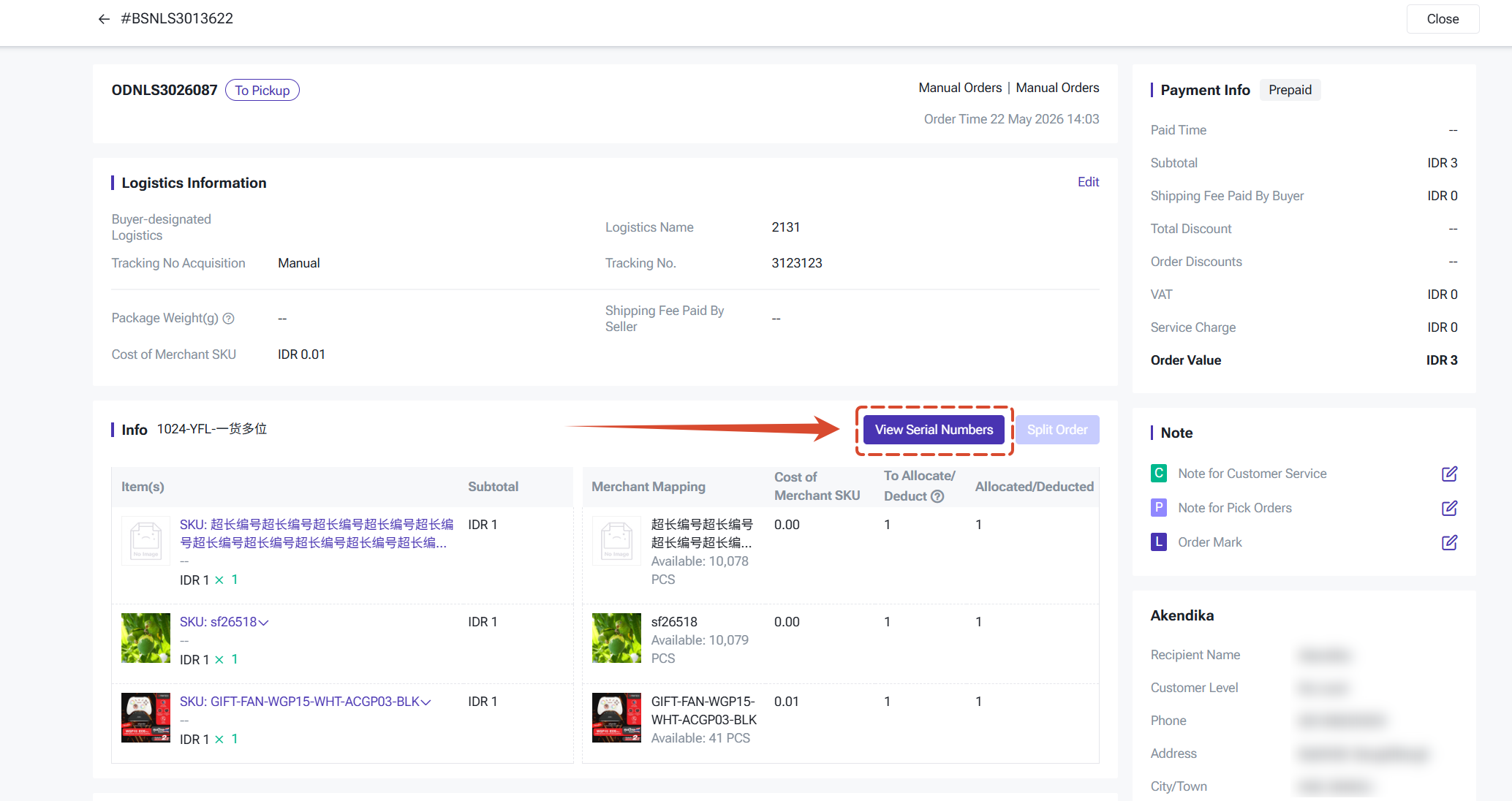
5.Order Shipment
For In Processing/Shipping list: A Enter/Edit Serial Numbers entry point is added at the package level. Serial number validation is automatically triggered when you click to
ship.
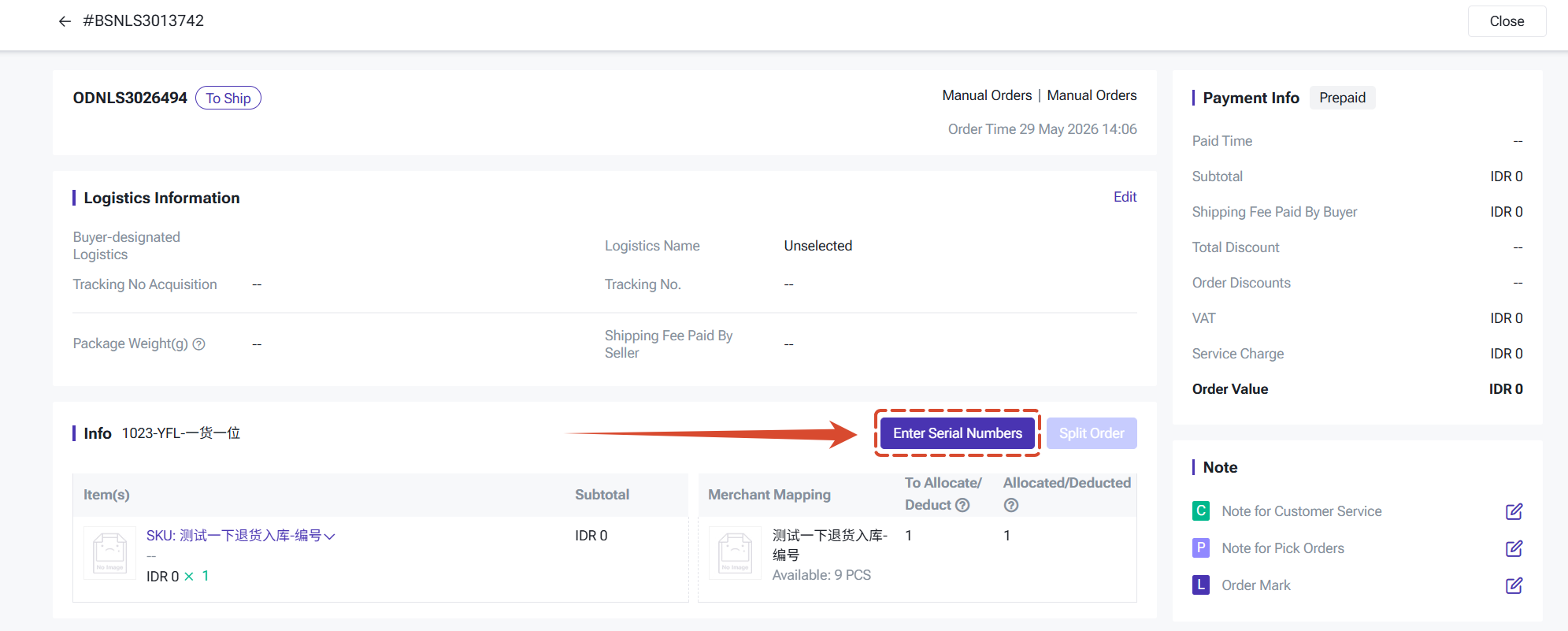
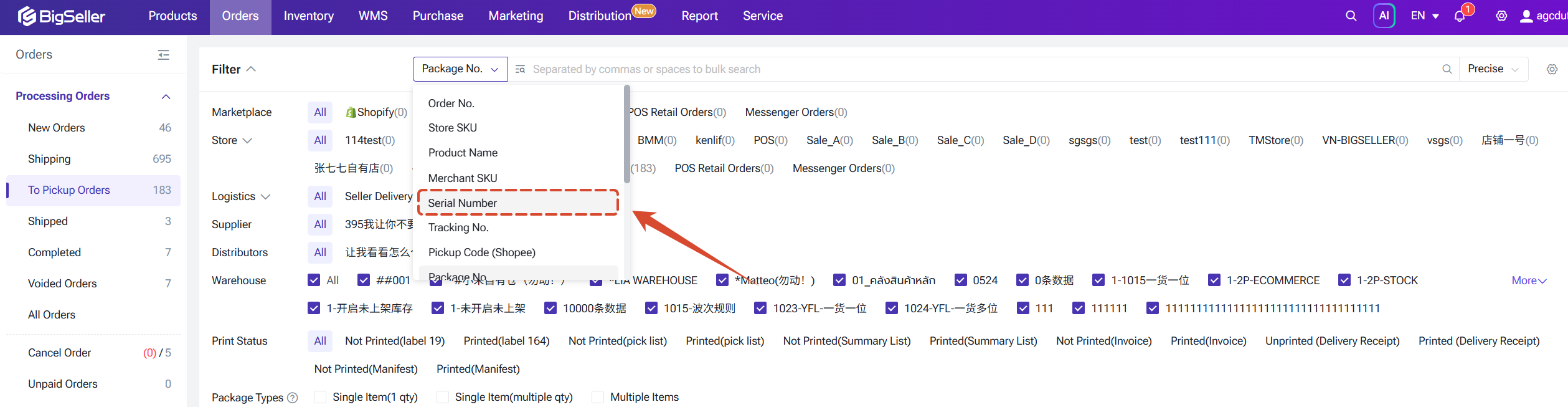
For To Pickup / Shipped / Completed list: The serial number is already bound to the package; viewing only is supported at this stage. Orders can be filtered by serial number.
6. WMS Scan Package
When a package contains SKUs with Serial Number management enabled:
- Scan Picking Basket No./ Sequential Matching: If any SKU has unregistered SNs, clicking Confirm will automatically open the SN entry pop-up; the shipping label prints automatically once entry is complete.
- Grouped SKUs Matching: Scan the SN code to directly match the SKU; the label prints once entry is complete.
- Serial number validation runs automatically before label printing. If validation fails, printing is blocked and the specific reason is shown.
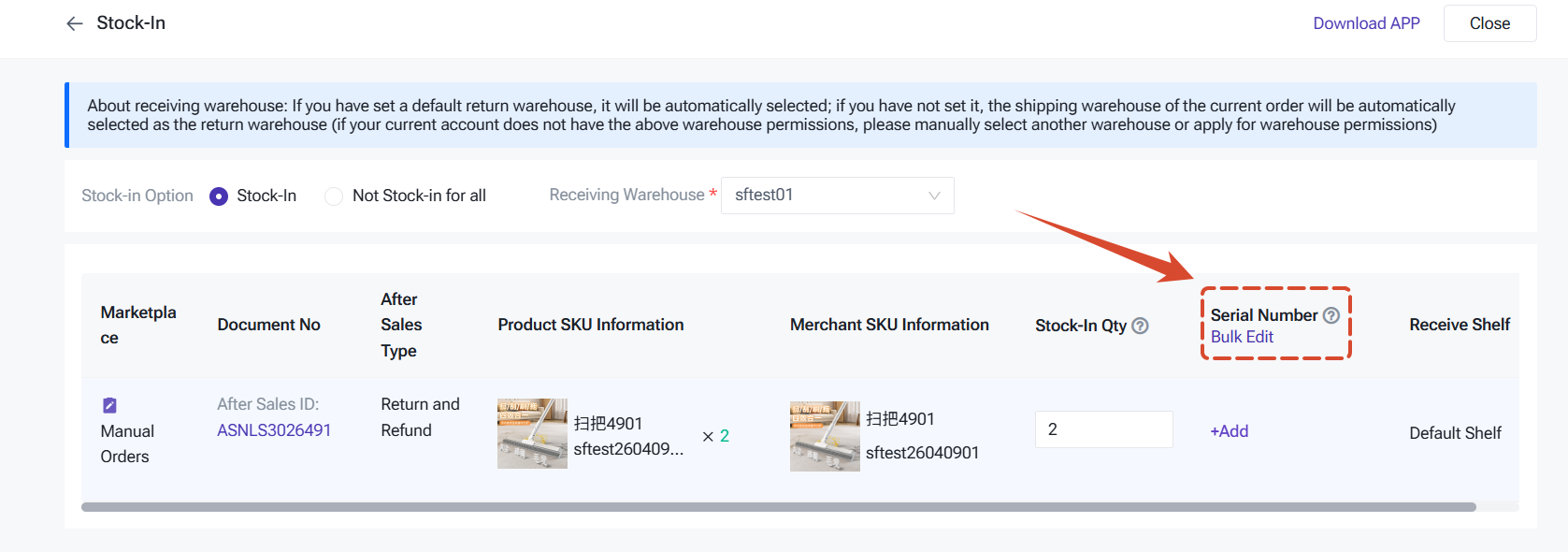
8.Stock In Return / Scan to Receive
A Serial Number field is added to each SKU row during return processing.
The system runs a return-specific validation: the serial numbers of returned items must exactly match those from the original stock-out shipment. Returns will only be successfully processed when they fully match. Once validated, the serial number status changes from Stocked-Out back to In Stock.
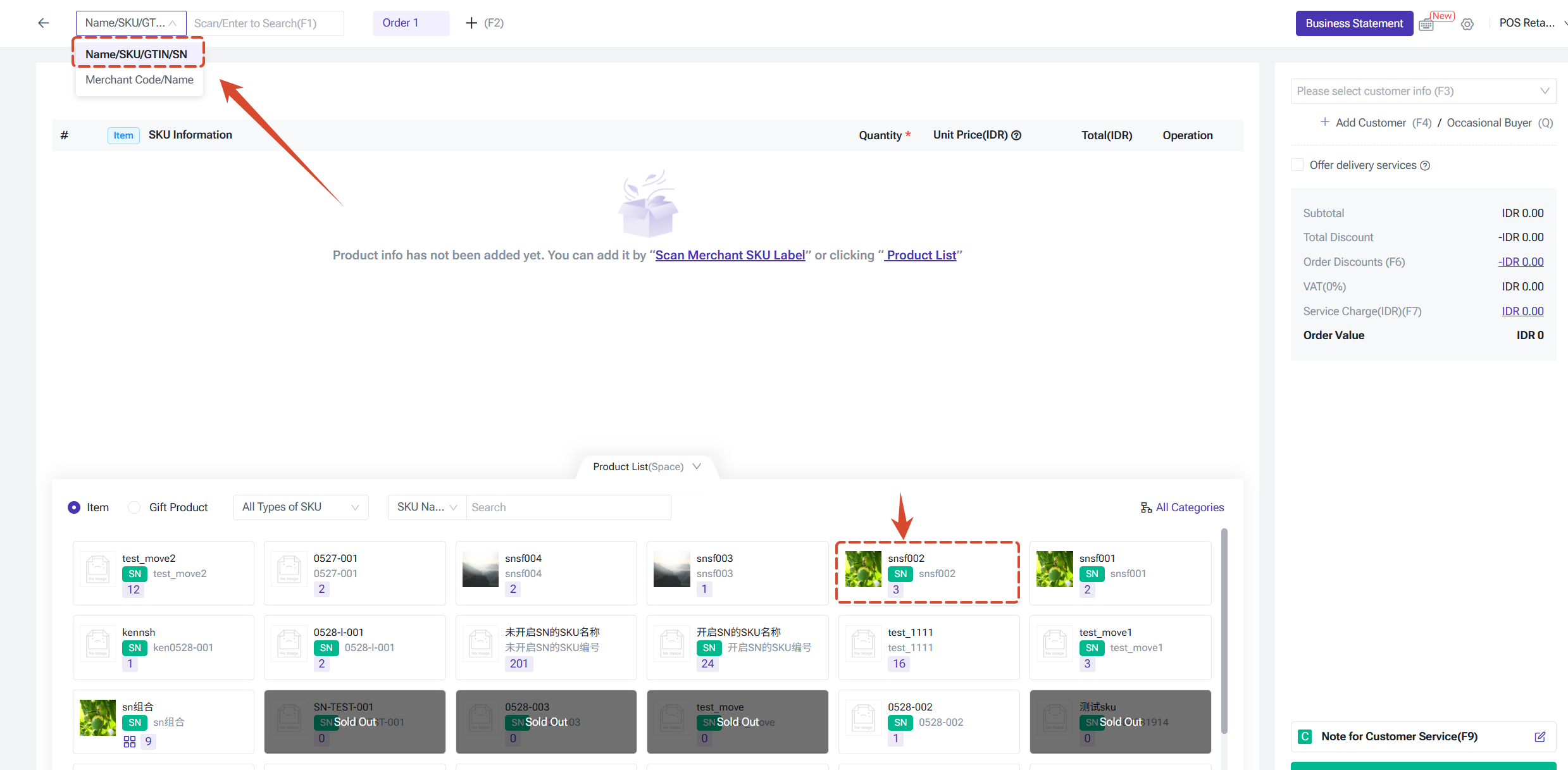
9. POS Orders
When settling a POS order, serial numbers can be scanned or entered to match the Merchant SKU. Before confirming payment, the system will prompt you to confirm whether serial numbers need to be entered; selecting yes opens the SN entry pop-up.
Serial Number Management Page
Once Serial Number management is enabled, a dedicated Serial Number Management page is added to the Inventory module. You can import serial numbers directly on this page to initialise historical SN records.
Other important points include:
Other important points include:
- Displays serial number data created within the past year (defaults to the past month on entry).
- Sorted by creation time, newest first by default.
- Filters: Serial number, SKU info, warehouse, status (In Stock / Out of Stock), condition (Good / Defective), creation date.
- Actions: Edit notes/condition, delete (single or bulk), view operation log.
- Export: Export selected or all records (XLSX format).
- Import & Create: Bulk import serial numbers — useful for back-filling historical SN data.
- Serial numbers with Out of Stock status are retained for 2 years.
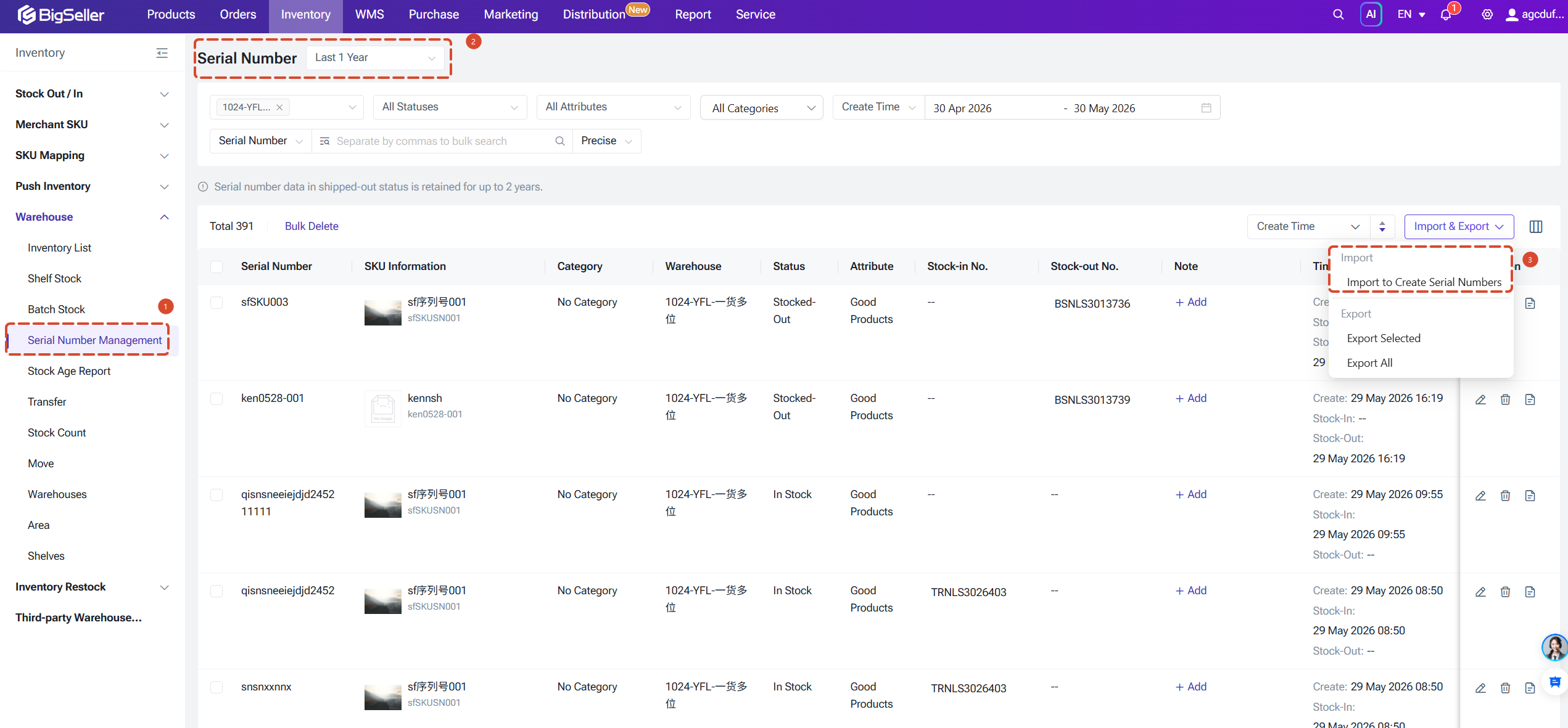
Note: Because certain inventory operations (e.g. stock count adjustments for overages or shortages) do not enforce serial number controls, the number of in-stock units and the number of in-stock serial numbers may fall out of sync. You can manually update serial number statuses on this page to reconcile any discrepancies.
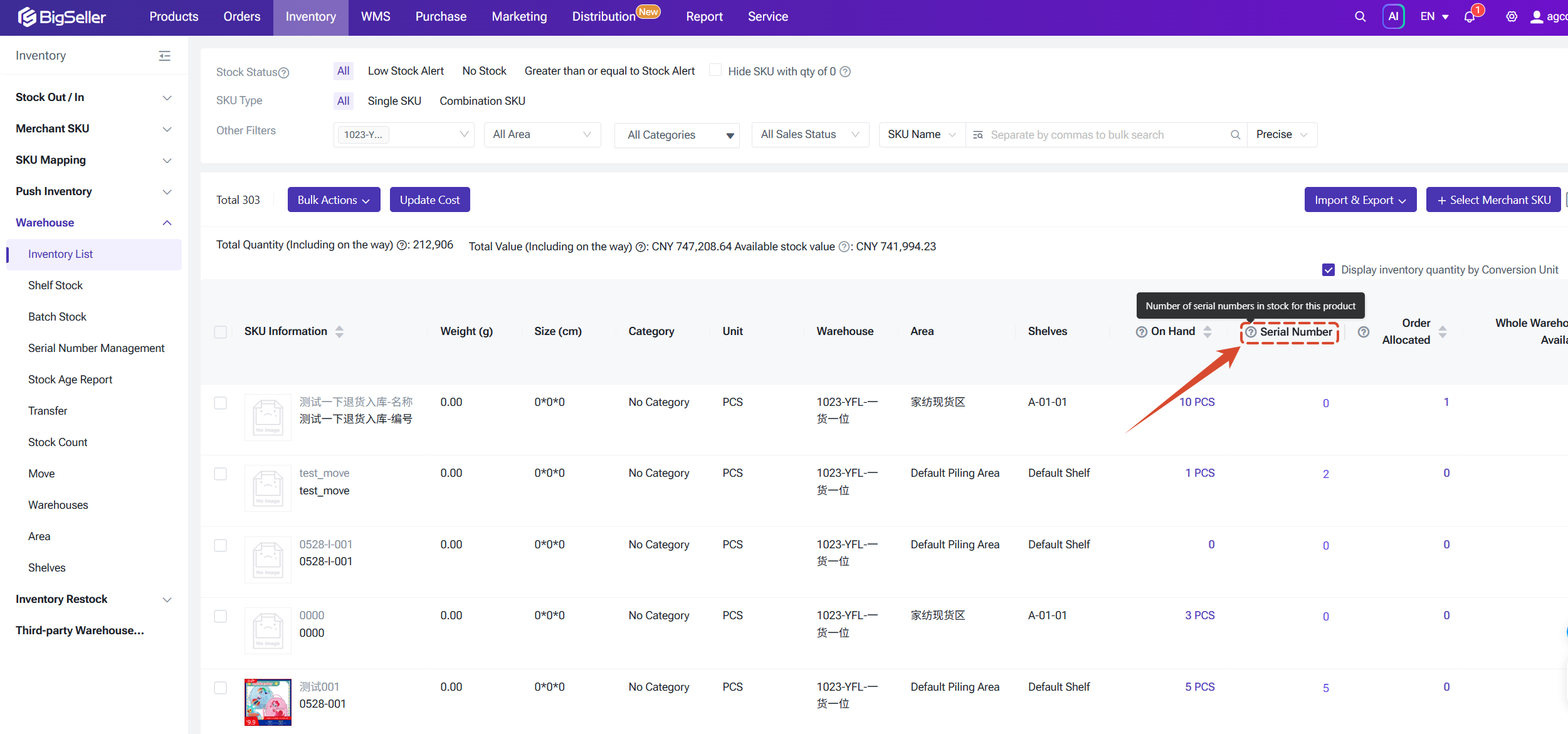
Serial Number Count in Inventory List
For SKUs with Serial Number management enabled, a Serial Number field is added to the Inventory List page showing the current number of in-stock serial numbers. This makes it easy to compare against the actual stock quantity and promptly identify any discrepancies.
Is this content helpful?
Thank you for your feedback. It drives us to provide better service.
Please contact us if the document can't answer your questions