Shopee Affiliate Marketing Data Report Introduction
Copy link & title
Update Time: 31 Aug 2026 07:19
BigSeller now offers the Shopee Affiliate Marketing Data Report feature, which automatically syncs and presents your Shopee affiliate marketing (AMS) data in one place — covering store performance, campaign effectiveness, product performance, affiliate partner contributions, and content-driven sales.
With this feature, you can:
With this feature, you can:
- View key metrics at a glance, including clicks, orders, sales, commission, and ROI;
- Attribute results across campaigns, products, affiliate partners, and content;
- Get data updated automatically on a daily basis (T+1);
- Filter and export reports for weekly or monthly reviews and commission reconciliation.
Quick Start
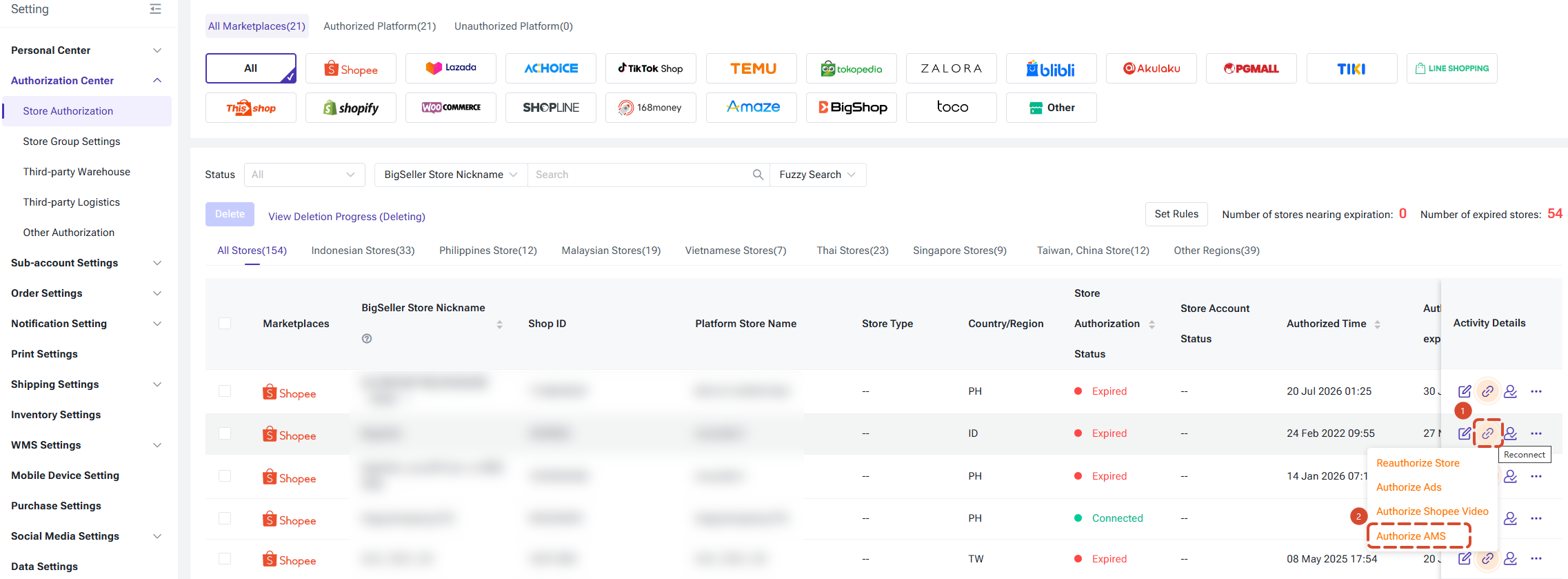
Step 1: Authorize Shopee Affiliate Marketing (AMS)
All report data is sourced from the Shopee Affiliate Marketing platform, so you need to complete the authorization before first use.
Step 2: Access the Feature Pages
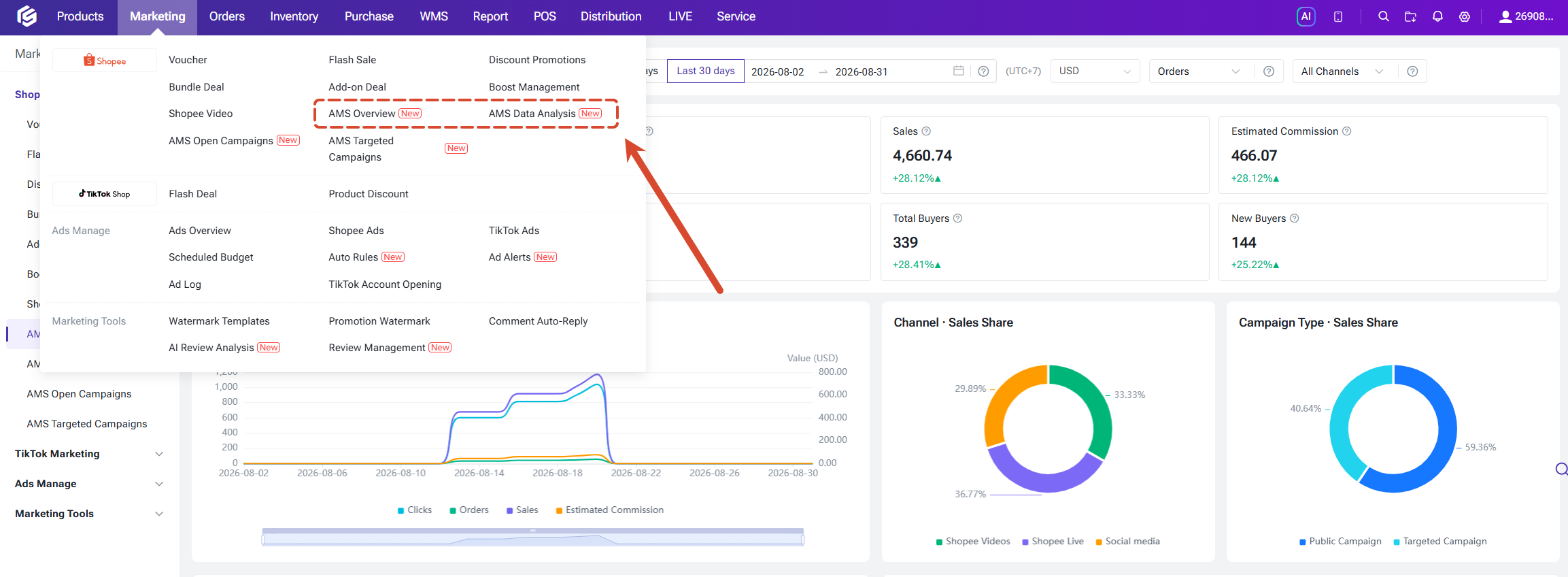
Go to Marketing > Affiliate Marketing to find the two newly added pages:
All report data is sourced from the Shopee Affiliate Marketing platform, so you need to complete the authorization before first use.
Step 2: Access the Feature Pages
Go to Marketing > Affiliate Marketing to find the two newly added pages:
- AMS Data Overview: store-level marketing performance at a glance, ideal for daily checks;
- AMS Data Analytics: four-dimensional analysis across campaigns, products, affiliates, and content, ideal for in-depth attribution.
Step 3: Set Filters and View Data
Commonly used filter defaults are preset for you. You can also adjust the filters as needed, and all data modules will refresh accordingly.
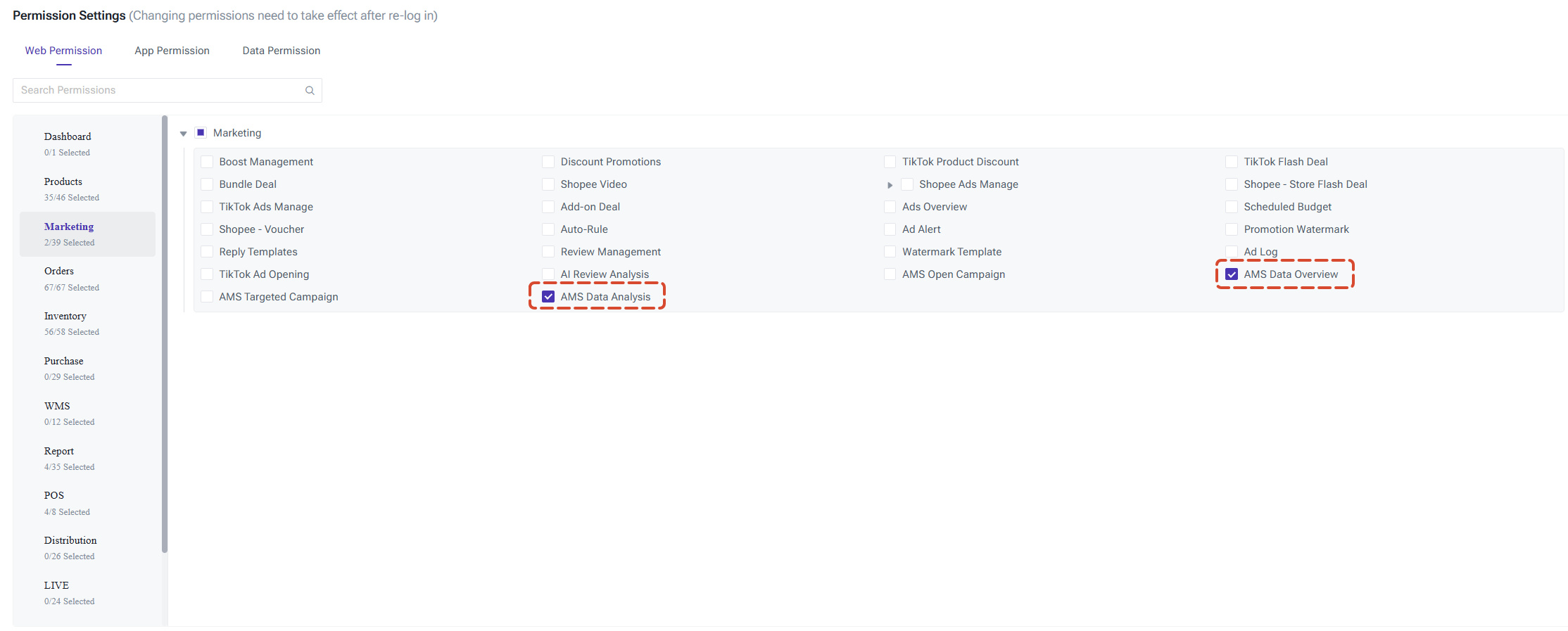
- Permission note: Administrators can grant access by assigning the "AMS Data Overview" and "AMS Data Analytics" page permissions to staff roles in the Permission Settings, enabling role-based access control.
AMS Data Overview
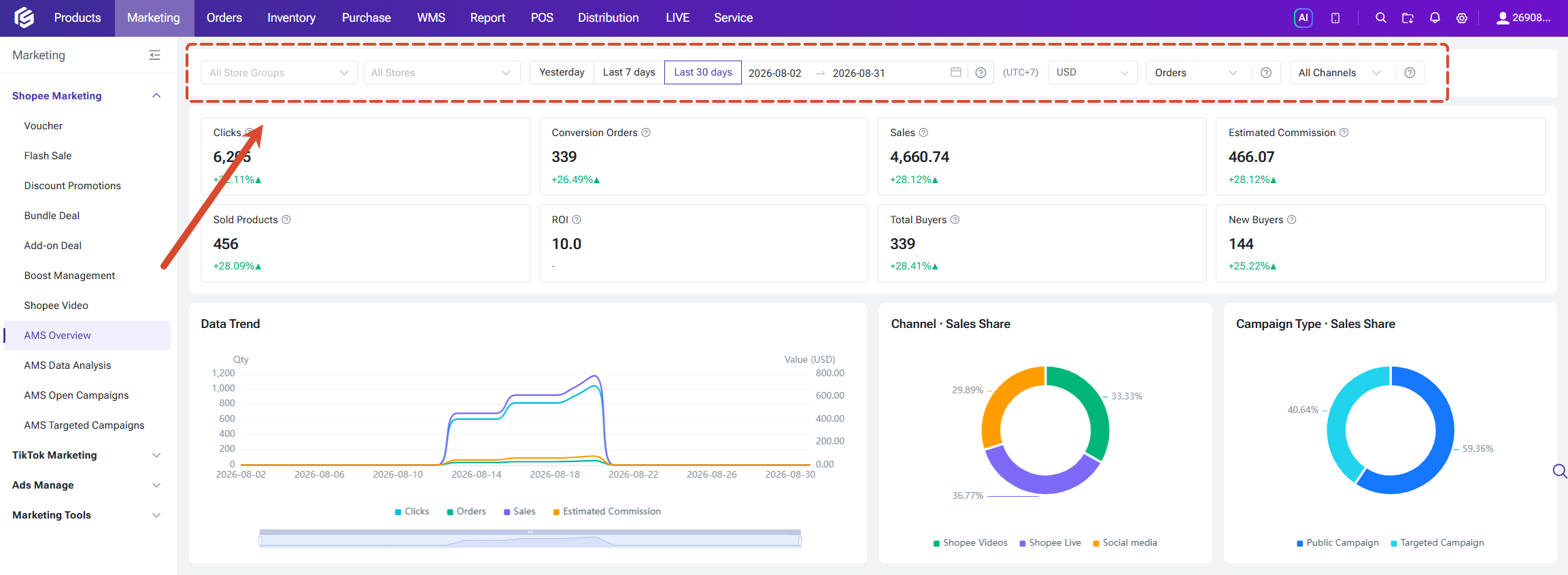
This page provides store-level affiliate marketing performance data and serves as the primary page for monitoring overall campaign results. Six filter options are available at the top of the page, and all data modules share the same filter settings:
- Store Group / Store: filter by store group or store;
- Time: quick selections of "Yesterday / Last 7 Days / Last 30 Days", or a custom date range (up to 90 days);
- Currency: defaults to USD and can be switched as needed;
- Order Status: Order Placed / Confirmed Orders, defaults to Order Placed;
- Channel: All Channels / Shopee Video / Shopee Live / Social Media.
The definitions of order status are as follows:
- Order Placed: all orders successfully submitted by buyers (including COD and non-COD orders), covering both paid and unpaid orders;
- Confirmed Orders: non-COD orders with completed payment, or COD orders with confirmed shipment (usually within 30 minutes after order placement).
Time is calculated based on the UTC+8 time zone. When the selected stores belong to the same site, statistics follow that site's time zone; when multiple sites are involved, statistics follow the time zone of the sales market.
Key Metric Cards
Eight key metrics are displayed at the top of the page, each with a "vs. Previous Period" comparison (e.g., yesterday vs. the day before) so you can quickly identify upward or downward trends:
Key Metric Cards
Eight key metrics are displayed at the top of the page, each with a "vs. Previous Period" comparison (e.g., yesterday vs. the day before) so you can quickly identify upward or downward trends:
- Clicks: total clicks on product links generated by affiliate promotions;
- Conversion Orders: total number of orders generated through affiliate marketing;
- Sales: total amount of all orders generated through affiliate marketing;
- Estimated Commission: estimated total commission corresponding to affiliate orders;
- Items Sold: total quantity of items sold through affiliate marketing;
- ROI: Sales ÷ Estimated Commission, used to evaluate the efficiency of affiliate investment;
- Total Buyers: total number of buyers who placed orders in your store through affiliate marketing;
- New Buyers: number of newly acquired buyers within the statistics period.

Data Trends
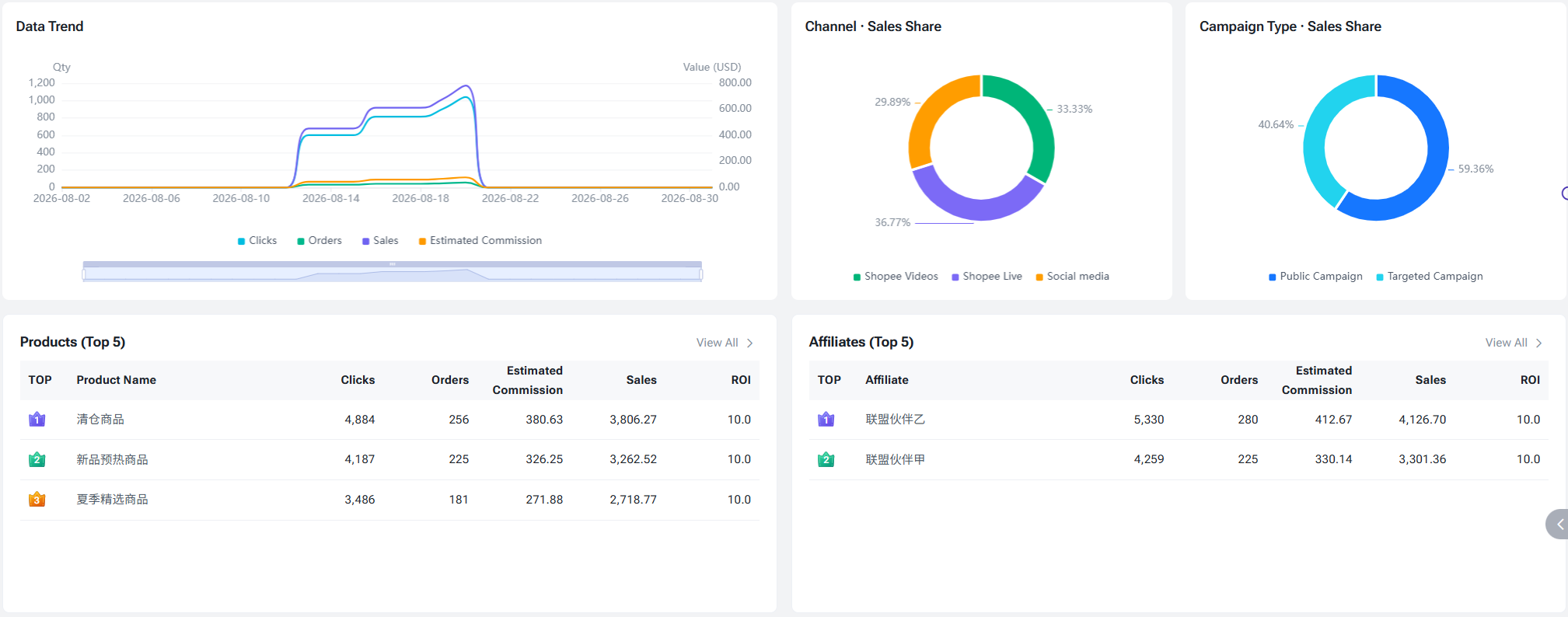
A line chart displays the trends of clicks, orders, sales, and estimated commission on a daily basis. Each metric can be shown or hidden by toggling the corresponding legend; hovering over the chart displays the metric values for the nearest date.
Sales Share
- Sales Share by Channel: a donut chart showing the sales share of Shopee Video, Shopee Live, and Social Media. This chart is not affected by the top "Channel" filter;
- Sales Share by Campaign Type: a donut chart showing the sales share of Open Campaigns and Targeted Campaigns.
Top Rankings
The Top 5 rankings by sales are displayed by default at the bottom of the page to help you quickly identify key contributors:
- Top Targeted Campaigns: campaign name, number of affiliates with orders, items sold, sales, and estimated commission;
- Top Products: product, clicks, orders, estimated commission, sales, and ROI;
- Top Affiliate Partners: affiliate partner, clicks, orders, estimated commission, sales, and ROI.
AMS Data Analytics
This page breaks down affiliate marketing performance from different dimensions and contains four tabs: Campaign Performance, Product Performance, Affiliate Performance, and Content Performance.
1. Campaign Performance
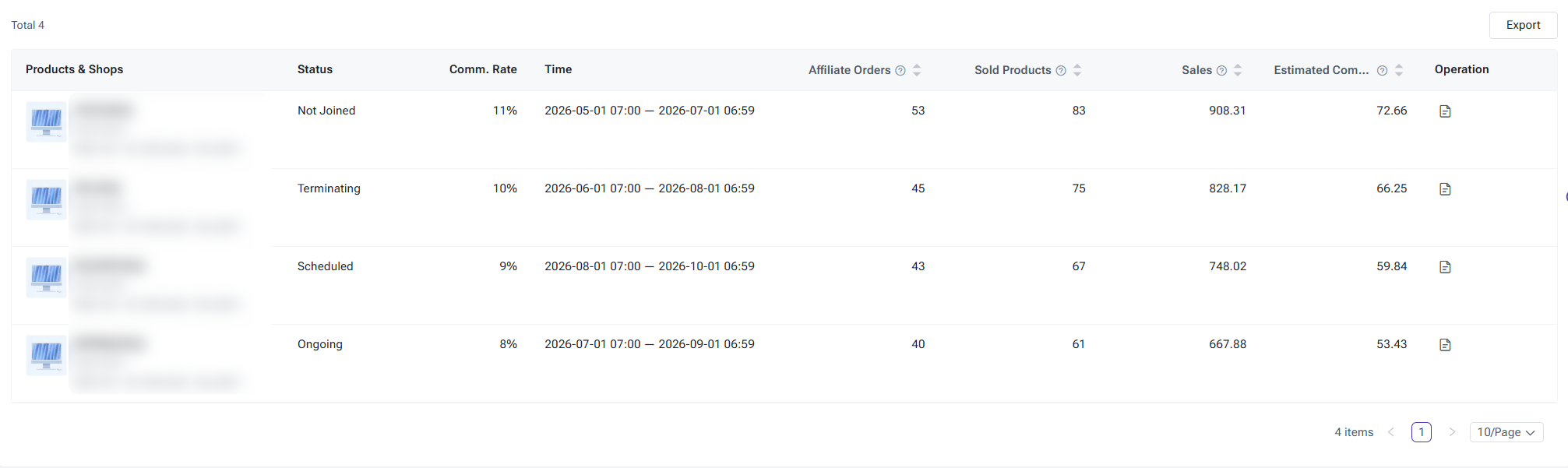
The Campaign Performance tab analyzes Open Campaigns and Targeted Campaigns separately, helping you evaluate the results of each campaign.
1. Campaign Performance
The Campaign Performance tab analyzes Open Campaigns and Targeted Campaigns separately, helping you evaluate the results of each campaign.
- Campaign Overview: displays four metrics — number of affiliates with orders, items sold, sales, and estimated commission, each with a vs. previous period comparison;

- Campaign List: switch between campaign types (Open Campaigns by default) and filter by status.

- List columns: campaign name, campaign ID, status, store nickname, campaign period, affiliates with orders, items sold, sales, and estimated commission;
2.Product Performance
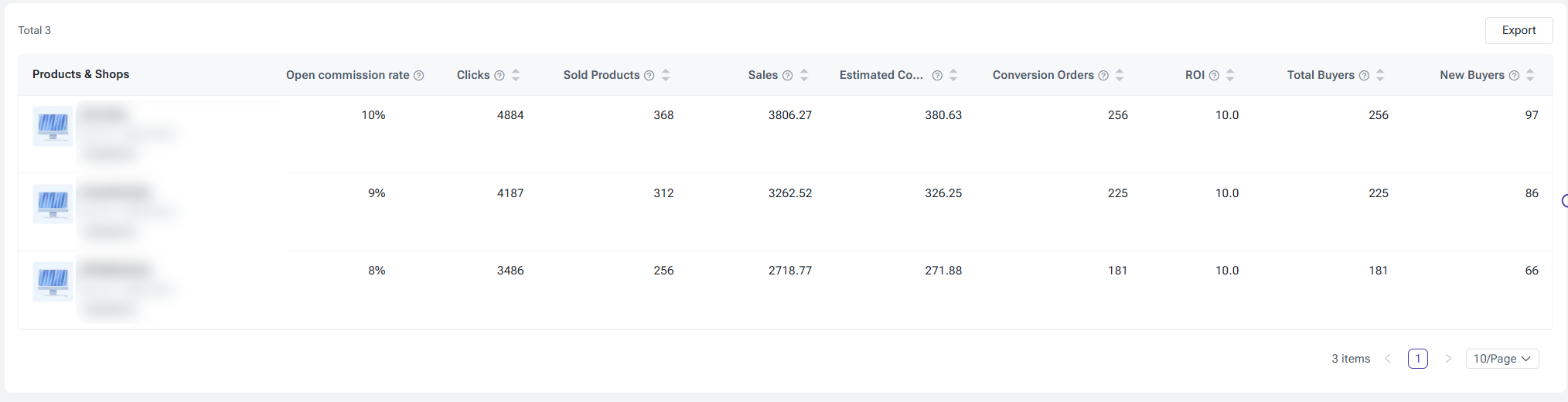
The Product Performance tab evaluates how individual products perform in affiliate marketing, helping you identify the products that are actually generating orders.
- Product Overview: displays clicks, items sold, sales, estimated commission, converted orders, ROI, total buyers, and new buyers, each with a vs. previous period comparison;

- List columns: product and store information (product image, product name, Item ID, store nickname), open campaign commission rate, clicks, items sold, converted orders, sales, estimated commission, ROI, total buyers, and new buyers;
3. Affiliate Performance
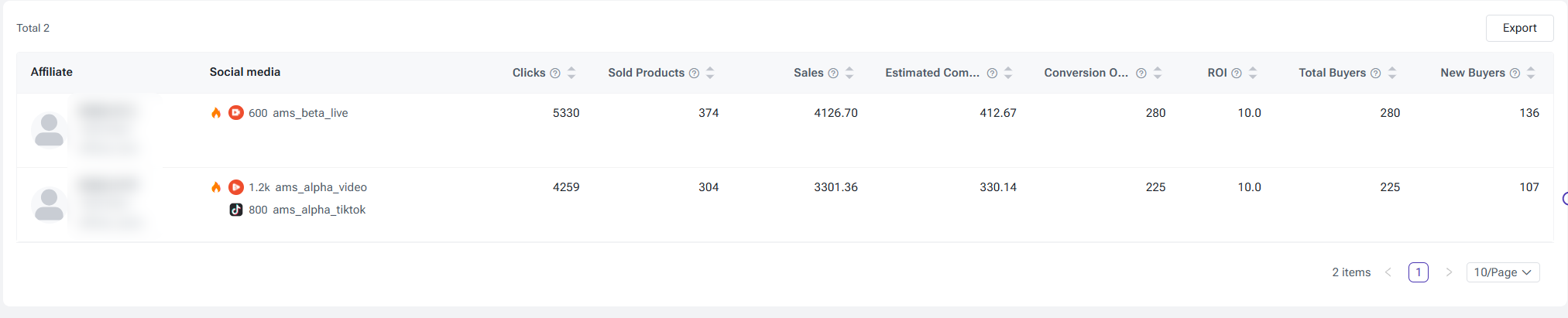
The Affiliate Performance tab evaluates each affiliate partner's contribution to help you optimize your partnership strategy.
- Affiliate Overview: displays clicks, items sold, sales, estimated commission, converted orders, ROI, total buyers, and new buyers, each with a vs. previous period comparison;

- List columns: affiliate partner information (avatar, affiliate name, username, affiliate ID), social media information, clicks, items sold, converted orders, sales, estimated commission, ROI, total buyers, and new buyers;
- Social Media Information: displays the affiliate's social media platform, follower count, and account name.
4. Content Performance
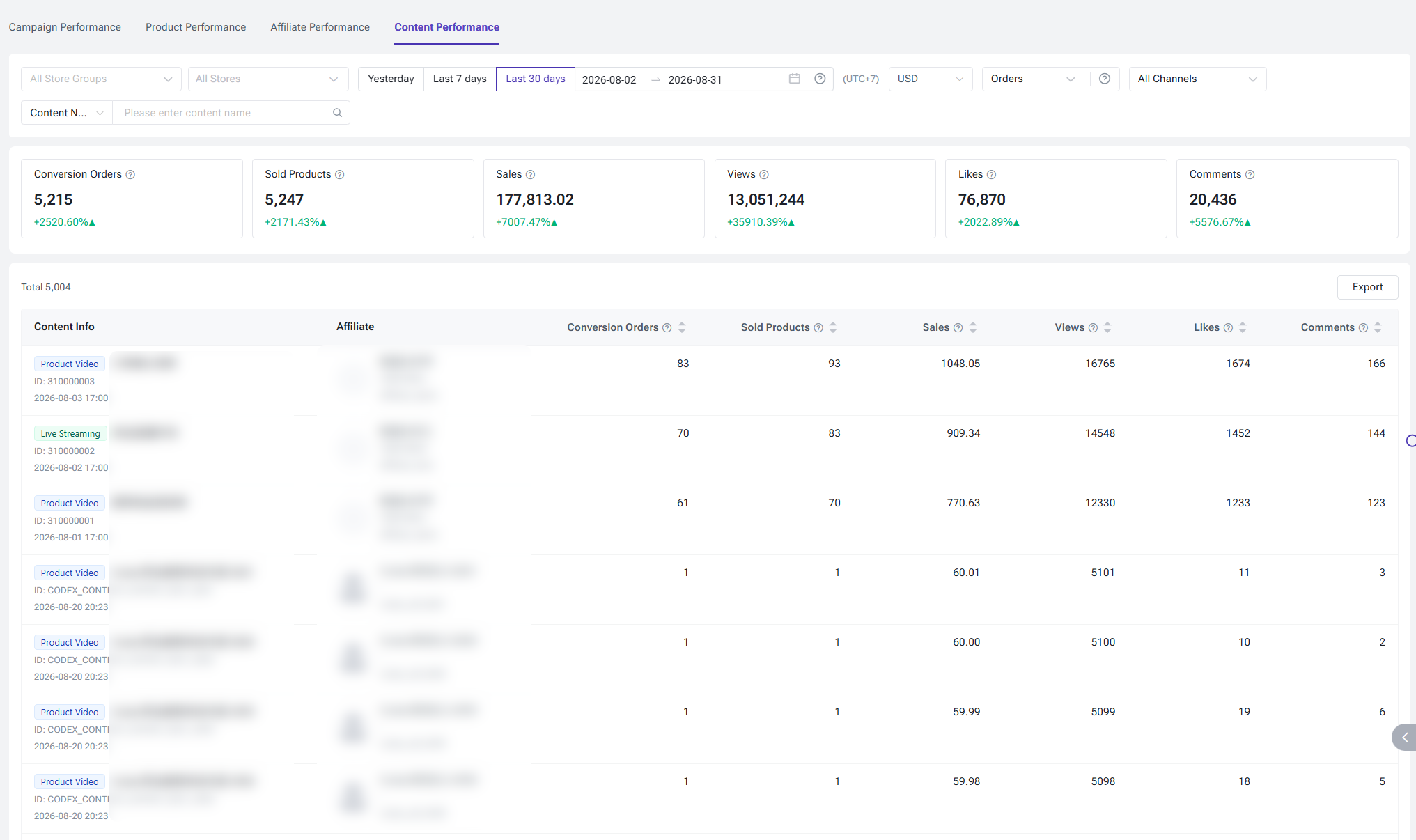
The Content Performance tab evaluates the sales-driving performance of content such as Shopee Video and Shopee Live.
- Content Overview: displays converted orders, items sold, sales, views, likes, and comments, each with a vs. previous period comparison;
- Content List: searchable by content ID or name (filters content by the associated product);
- List columns: content information (content type tag: Video / Live, content title, content ID, publish time), affiliate partner, converted orders, items sold, sales, views, likes, and comments.
By comparing content with high views but low conversions against content with high conversions but low views, you can identify the content strategies that truly drive sales.
Is this content helpful?
Thank you for your feedback. It drives us to provide better service.
Please contact us if the document can't answer your questions