BigSeller Purchase -- To make high efficiency purchase process
Update Time: 23 Jun 2026 12:02
BigSeller provides sellers with a fully integrated, end-to-end procurement solution — covering supplier management, intelligent restock suggestions, detailed purchase planning, one-click ordering via 1688, and goods receipt with inventory updates. This article gives you a quick overview of BigSeller's core purchase modules and the complete workflow.
The workflow is as follows:
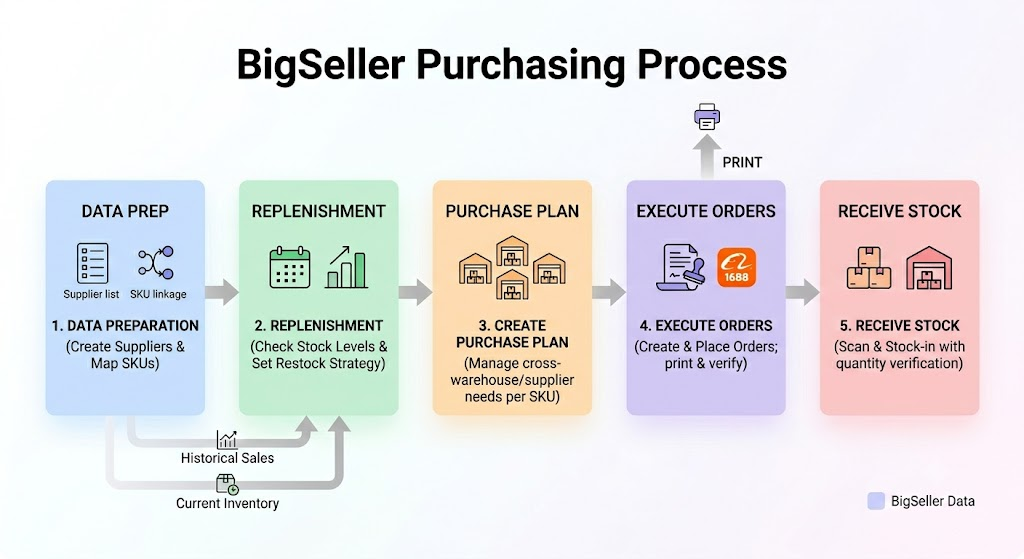
1. Supplier & Supply Source Management
Before starting any purchase activity, you'll need to set up your supplier information in the system and link your Merchant SKUs to the corresponding suppliers.
👉 Introduction to Supplier List (Purchase)
2. Smart Restocking: Purchase Suggestion
BigSeller automatically calculates and generates daily intelligent restock suggestions based on your historical sales, current inventory, and in-transit stock — helping you stock up before shortages occur.
👉 Introduction to Purchase Suggestion
3. Flexible Collaboration: Purchase Plan
To move beyond the traditional limitation of one purchase order per supplier per warehouse, BigSeller introduces the Purchase Plan module. It enables operations and procurement teams to divide work efficiently and manage restock needs at the Merchant SKU level.
👉 Introduction to Purchase Plan
4. Core Execution: Purchase Order Management (incl. 1688 Integration)
A Purchase Order is the final procurement document sent to your supplier. You can create one manually, import in bulk via Excel, or generate directly from a Purchase Suggestion or Purchase Plan.
👉 Introduction to Purchase Feature
BigSeller is also deeply integrated with 1688, allowing procurement and finance teams to sync and track orders without switching between systems.
👉 Introduction to 1688 Purchase Order (Place 1688 Purchase Orders in BigSeller)
5. Supporting Operations: Purchase Order Print Settings
When a Purchase Order is in In Transit / Partially Received / Completed status, you can print it for warehouse staff to verify incoming goods.
👉 How to Print Purchase Orders?
6. Closing the Loop: Purchase Order Receiving
Once goods arrive at the warehouse, they must be received in the system promptly to deduct in-transit stock and update available inventory accordingly.
Is this content helpful?
Thank you for your feedback. It drives us to provide better service.
Please contact us if the document can't answer your questions