How to use Comment Auto Reply (AI-Powered) ?
Copy link & title
Update Time: 03 Jun 2026 07:27
Buyer reviews are a core driver of store conversion rates — especially high-quality reviews with photos or videos, which directly influence purchasing decisions for new buyers. BigSeller's newly upgraded Comment Auto-Reply feature supports precise reply triggering based on star rating, keywords, category, specific products, and more. It also introduces AI Smart Reply and AI Review Analysis, making every response feel closer to a real buyer interaction and helping you efficiently maintain your store's reputation and improve your platform ranking.
Note:
Note:
- Comment Auto-Reply currently supports Shopee and Lazada.
- BigSeller replies to customers' reviews every 2 hours.
- For the free plan, the quota of auto replies is 20/ marketplace every day. If you want more auto replies, please upgrade your plan.
The Comment Auto-Reply module is divided into two sections: Store Auto-Reply and Reply Templates.
Reply Templates serve as a content library for centrally creating and managing reusable reply scripts. Store Auto-Reply is the execution layer, where triggering rules and switches are configured for each individual store. The two sections are independent — we recommend building your templates first, then linking them in your store settings.
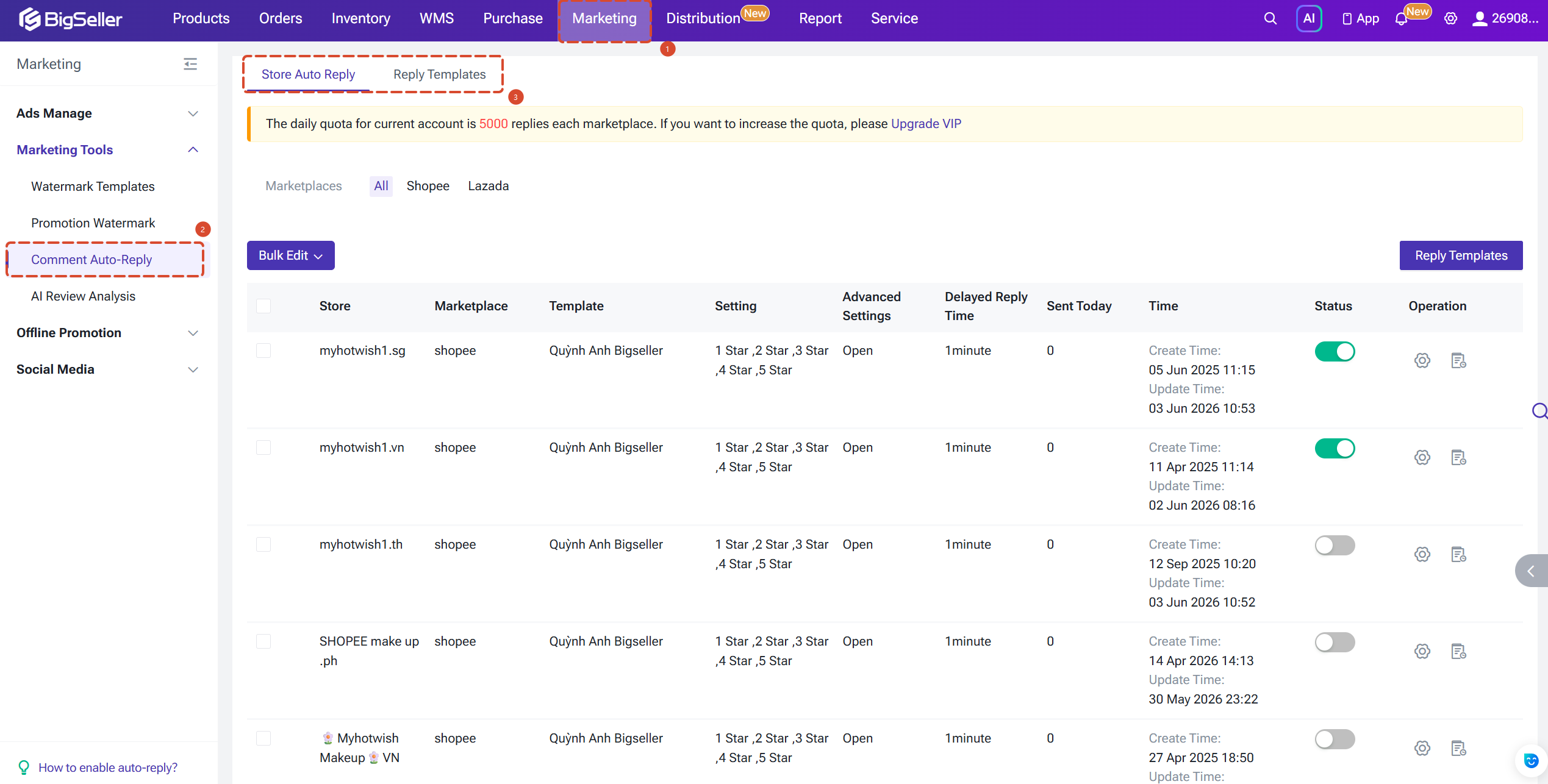
Reply Templates serve as a content library for centrally creating and managing reusable reply scripts. Store Auto-Reply is the execution layer, where triggering rules and switches are configured for each individual store. The two sections are independent — we recommend building your templates first, then linking them in your store settings.
Reply Templates
The Reply Templates page supports fuzzy search by template name, making it easy for sellers managing multiple product lines to quickly locate the right template. Each template displays its applicable star rating range, whether Advanced Settings are enabled, and its creation and last-updated timestamps.
We recommend creating dedicated templates for each major product line or star rating tier, and including product keywords in the template name (e.g. "Headphones-5Star-Positive") for easier matching in Advanced Settings later.
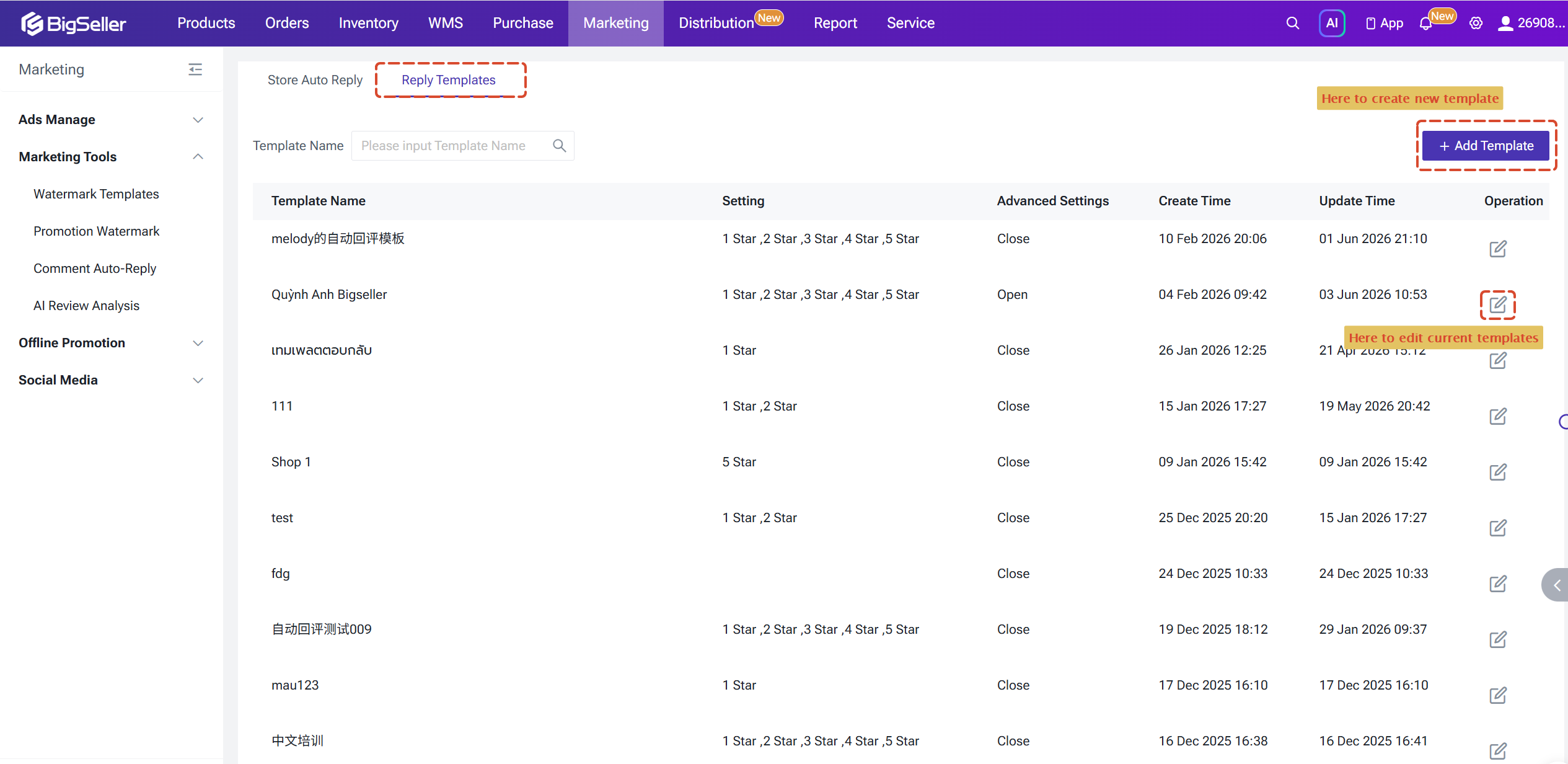
When creating a reply template, you can set up to 10 replies for each rating. BigSeller will randomly select one as a reply.
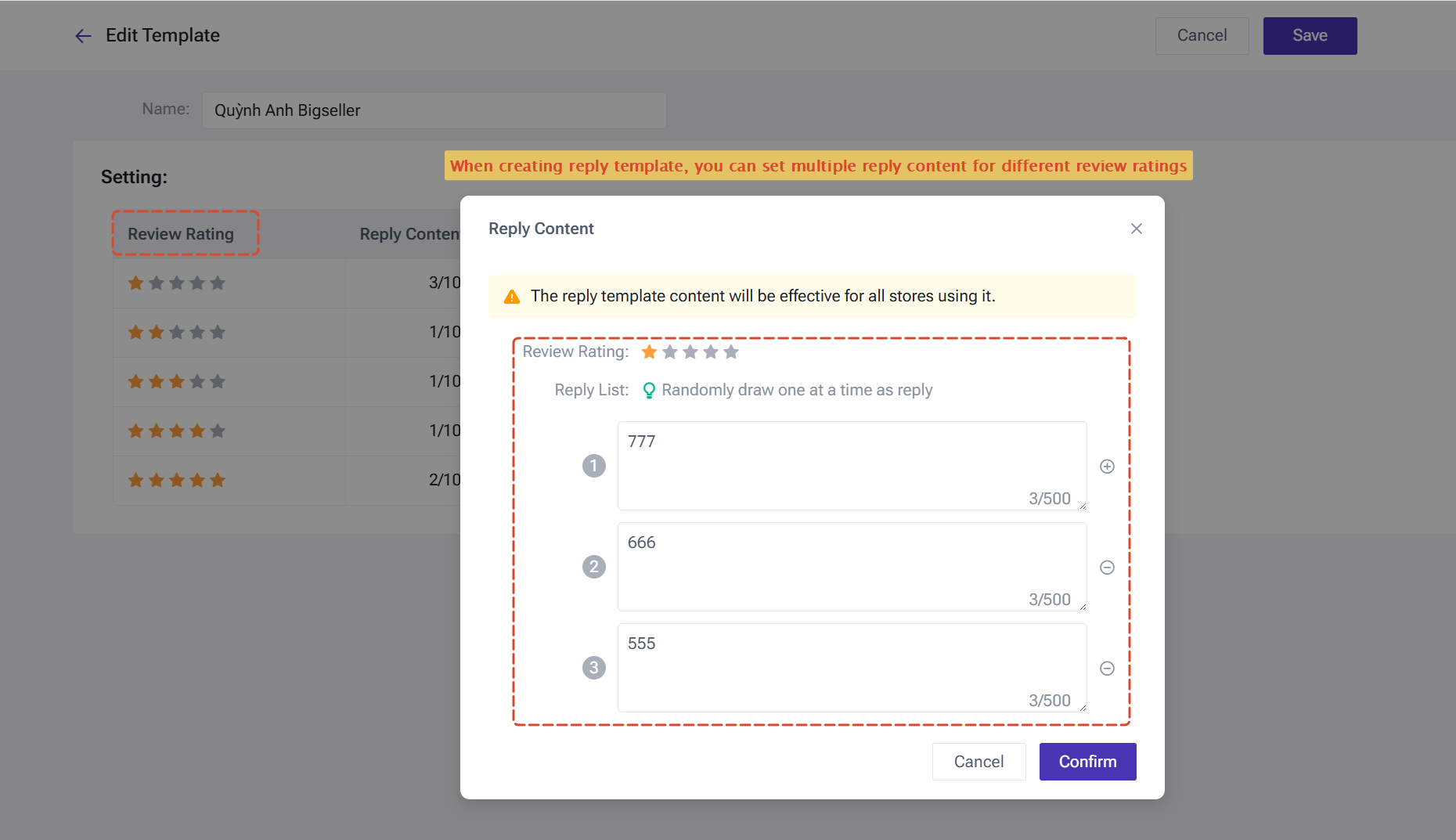
We recommend creating dedicated templates for each major product line or star rating tier, and including product keywords in the template name (e.g. "Headphones-5Star-Positive") for easier matching in Advanced Settings later.
When creating a reply template, you can set up to 10 replies for each rating. BigSeller will randomly select one as a reply.
Store Auto-Reply Settings
The Store Auto-Reply page lists all authorized stores under your account. Each store can be configured independently with its own reply rules.
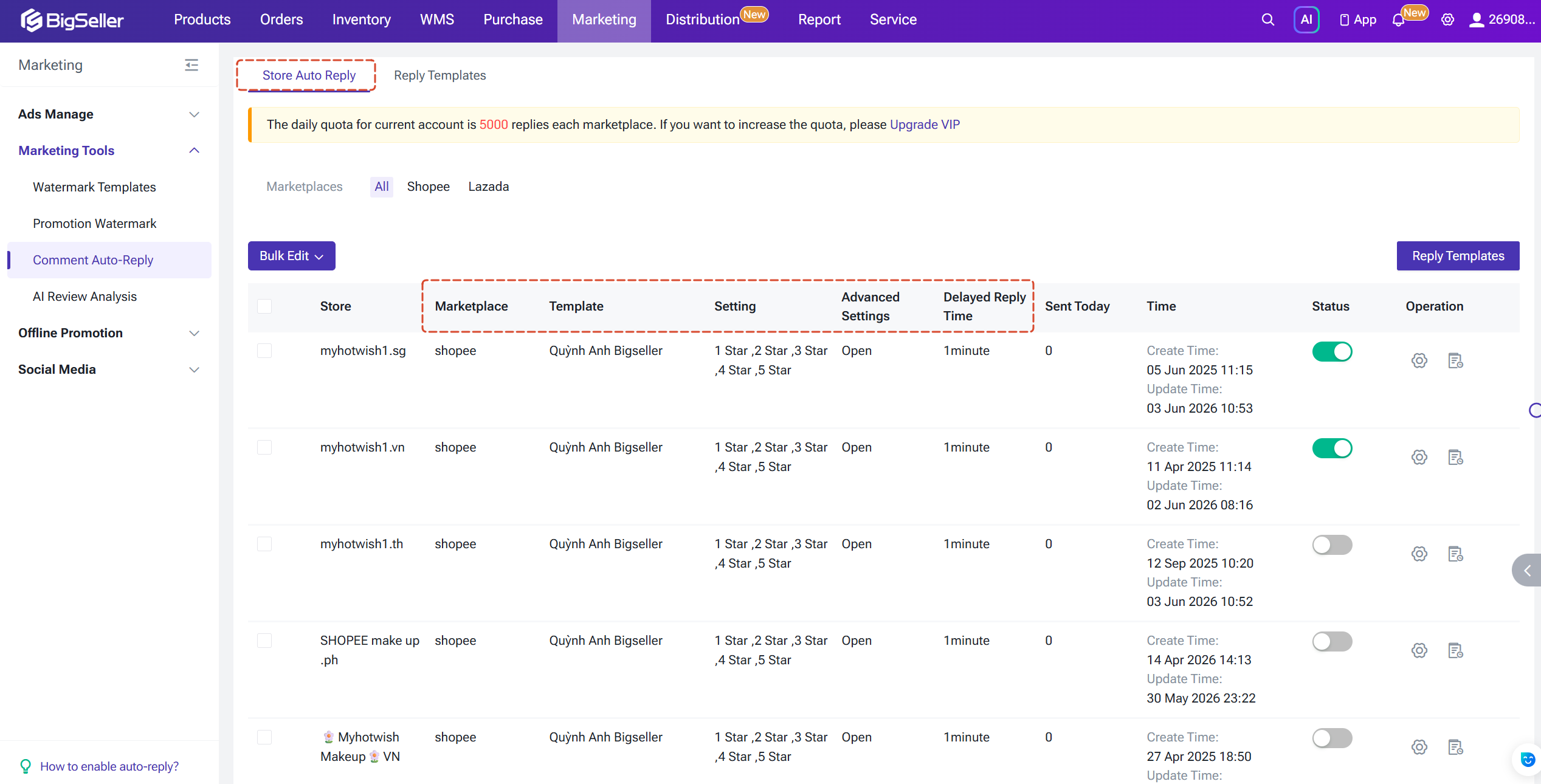
The main settings include: the linked reply template, the star rating range that triggers auto-reply, the reply delay duration, and whether Advanced Settings are enabled.
The main settings include: the linked reply template, the star rating range that triggers auto-reply, the reply delay duration, and whether Advanced Settings are enabled.
- Store-Level Auto-Reply Settings: The auto-reply switch is set at the store level. Multiple stores can use the same reply template, and replies can be enabled or disabled based on different star ratings. For example, Store A can enable auto-replies for 1–3 star reviews, while Store B can enable replies for 4 and 5 star reviews.
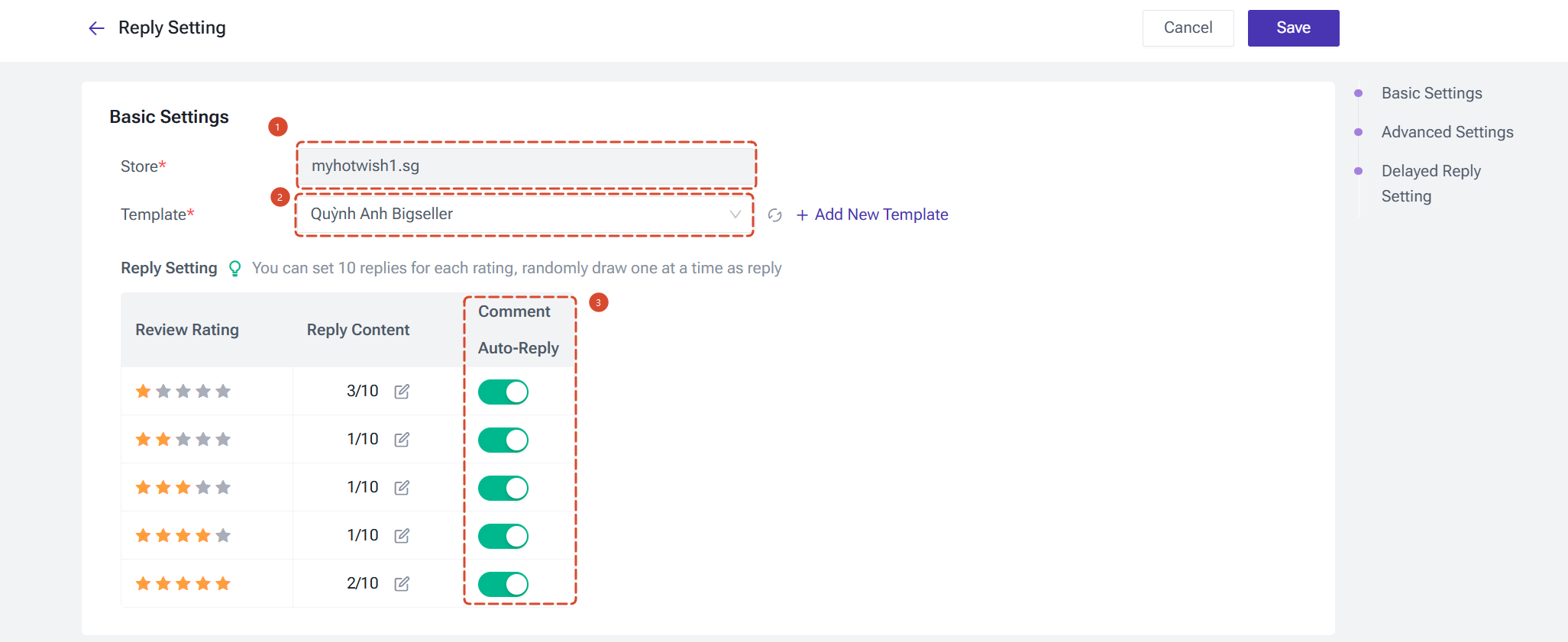
- Customizable Delay Duration: The delayed reply helps improve user experience by preventing immediate automated responses. If a reply is sent too quickly after a review, buyers may feel it's automated. By setting a minimum delay, responses appear more natural. For example, if you set at least a 10-minute delay, the system will skip reviews made within the last 10 minutes and reply to them in the next task.

Advanced Settings
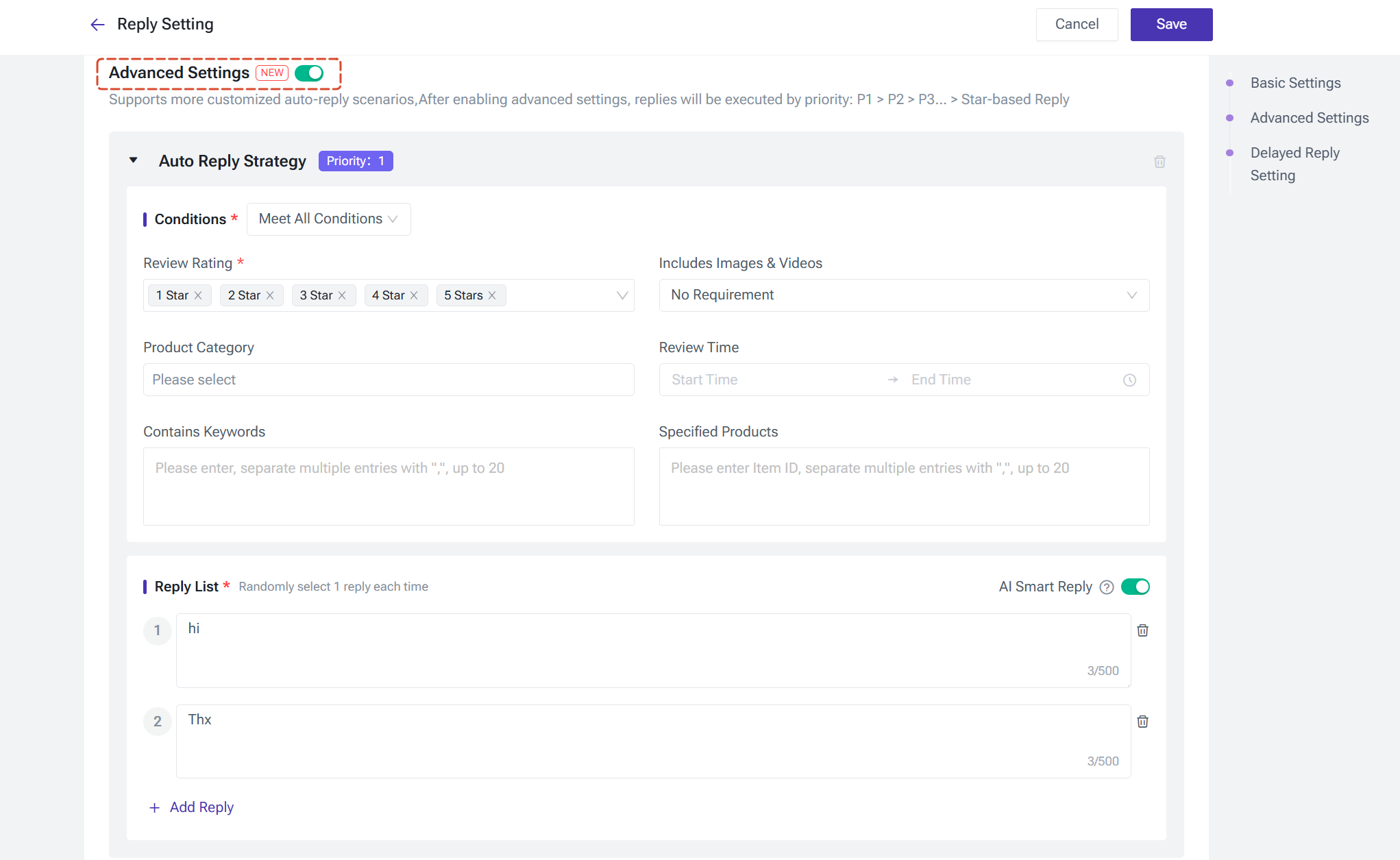
Advanced Settings is the core feature of this upgrade, designed for sellers managing multiple products and scenarios.
Once enabled, you can configure up to 10 prioritized auto-reply strategies for a single store. The system matches and executes them in order — P1, P2, P3, and so on. If none of the advanced strategies match, the system falls back to the basic star rating reply configuration.
Each new strategy is assigned the next lowest priority. If a strategy is deleted, the remaining ones are automatically renumbered. Up to P10 can be configured in total.
Trigger Conditions
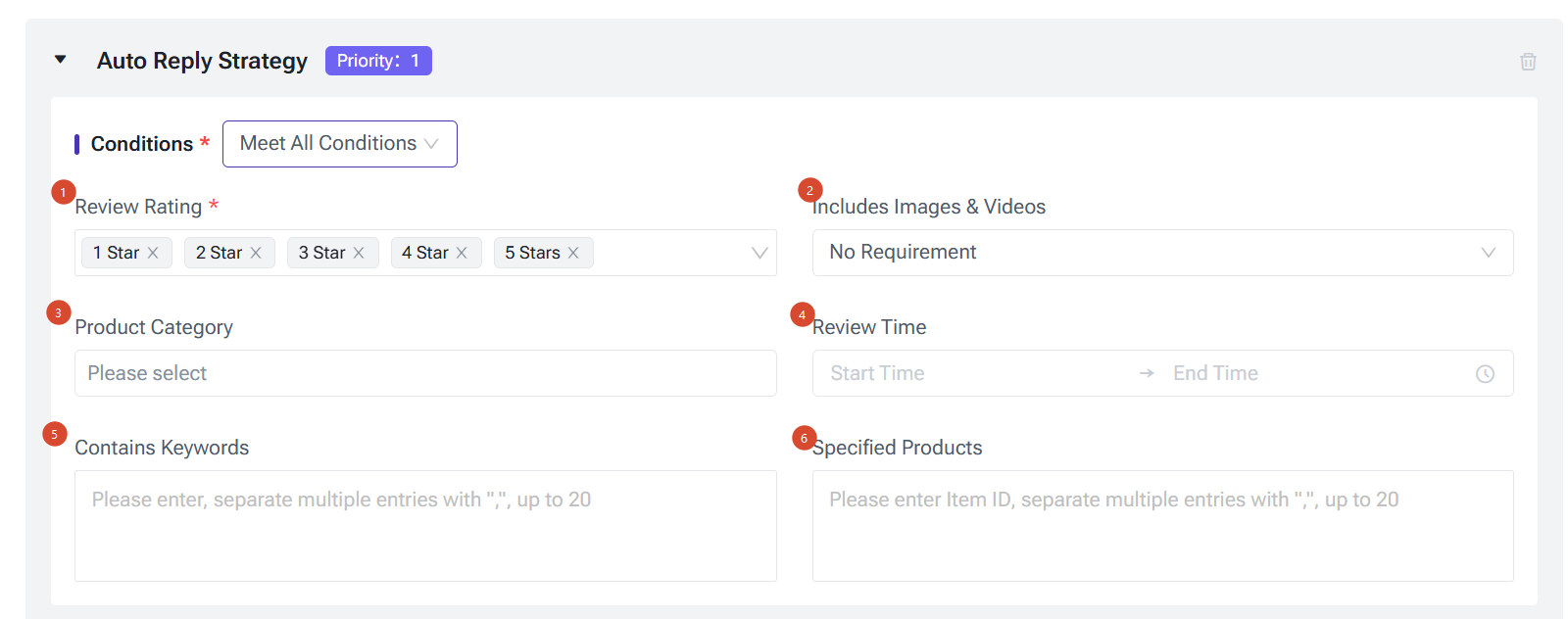
All configured conditions within a strategy must be met simultaneously for the auto-reply to trigger. Available conditions include:
Once enabled, you can configure up to 10 prioritized auto-reply strategies for a single store. The system matches and executes them in order — P1, P2, P3, and so on. If none of the advanced strategies match, the system falls back to the basic star rating reply configuration.
Each new strategy is assigned the next lowest priority. If a strategy is deleted, the remaining ones are automatically renumbered. Up to P10 can be configured in total.
Trigger Conditions
All configured conditions within a strategy must be met simultaneously for the auto-reply to trigger. Available conditions include:
- Star Rating (required): Multi-select from 1–5 stars.
- Contains Photo & Video (optional): Options include No Requirement, Contains Photo, Contains Video, and Contains Photo or Video. This condition lets you exclude photo or video reviews from auto-reply, reserving them for manual responses — since these reviews carry the most weight in new buyers' decisions and a uniform script fails to reflect their value.
- Contains Keywords (optional): Enter multiple keywords separated by commas. Up to 20 keywords, each capped at 50 characters.
- Product Category (optional): Select from categories linked to your store's site, down to leaf-level nodes. Up to 10 categories.
- Specific Products (optional): Enter Item IDs (Shopee) or Product IDs (Lazada), separated by commas. Up to 20 products.
- Review Time (optional): Set a time window for triggering replies, e.g. 08:00–22:00. Times are based on the local timezone of the review's origin.
Reply List
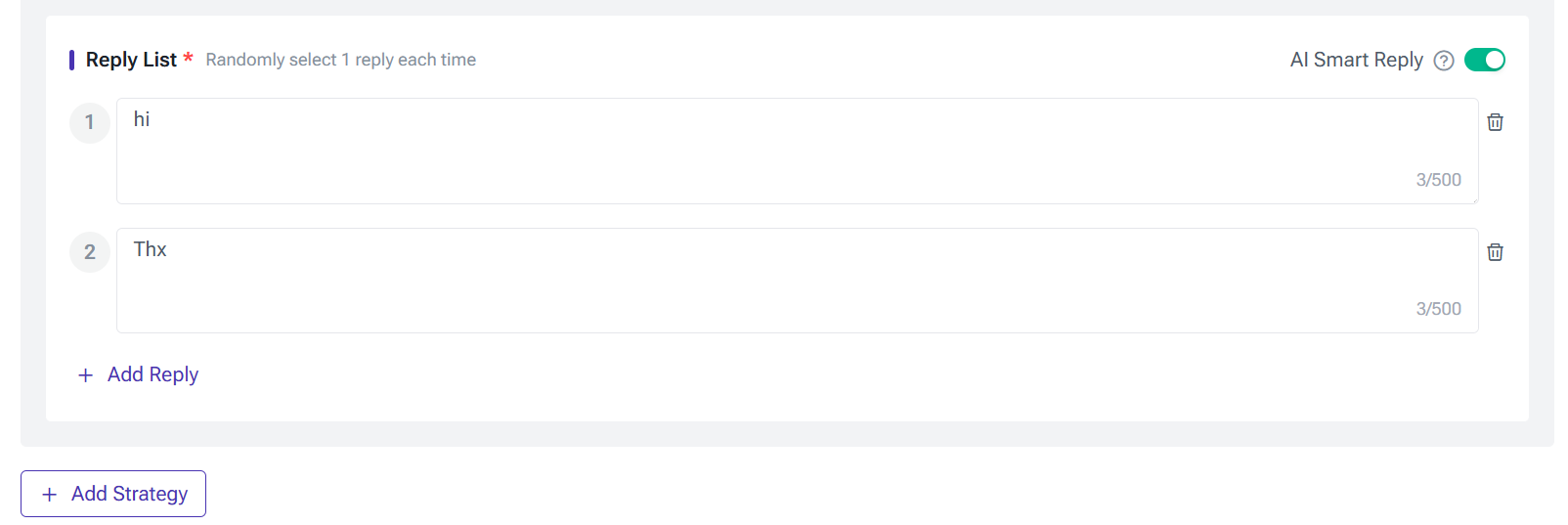
Each strategy supports up to 10 reply scripts. The system randomly selects one each time a reply is triggered.
AI Smart Reply
Within each strategy's reply list, you can enable the AI Smart Reply toggle. Once enabled, the system passes the review's star rating and content to the AI reply engine, which generates a personalized response that mimics a natural, human tone — avoiding repetitive, mechanical replies.
AI Smart Reply is billed by usage: every 10 replies consume 1 Big Coin, with any remainder rounded up to 1 BigCoin. If your Big Coin balance runs out, the system automatically falls back to your configured reply scripts and continues without interruption.
AI Review Analysis
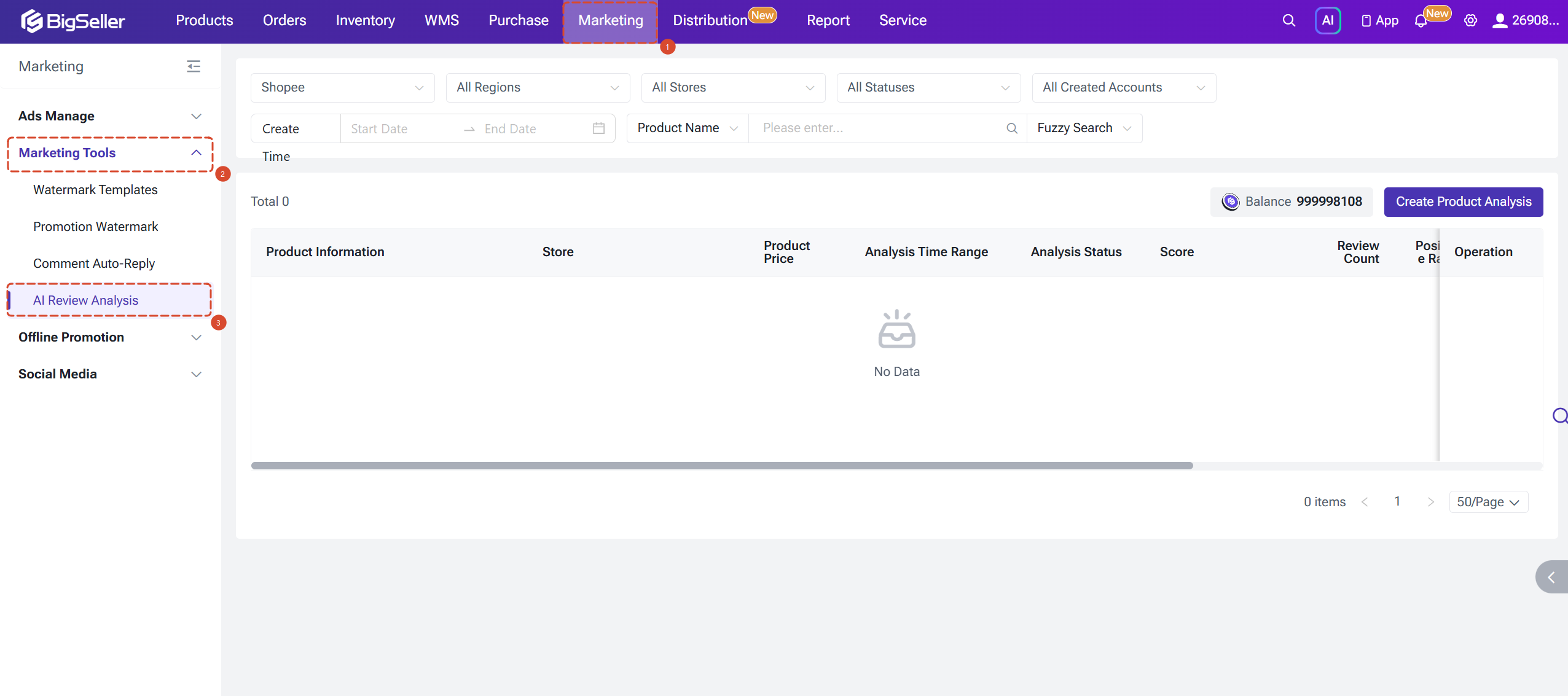
AI Review Analysis extends the Comment Auto-Reply module with data intelligence. It performs a deep AI-powered analysis of buyer reviews for selected products within a chosen time range, distilling actionable insights from large volumes of buyer feedback.
Creating an Analysis Task
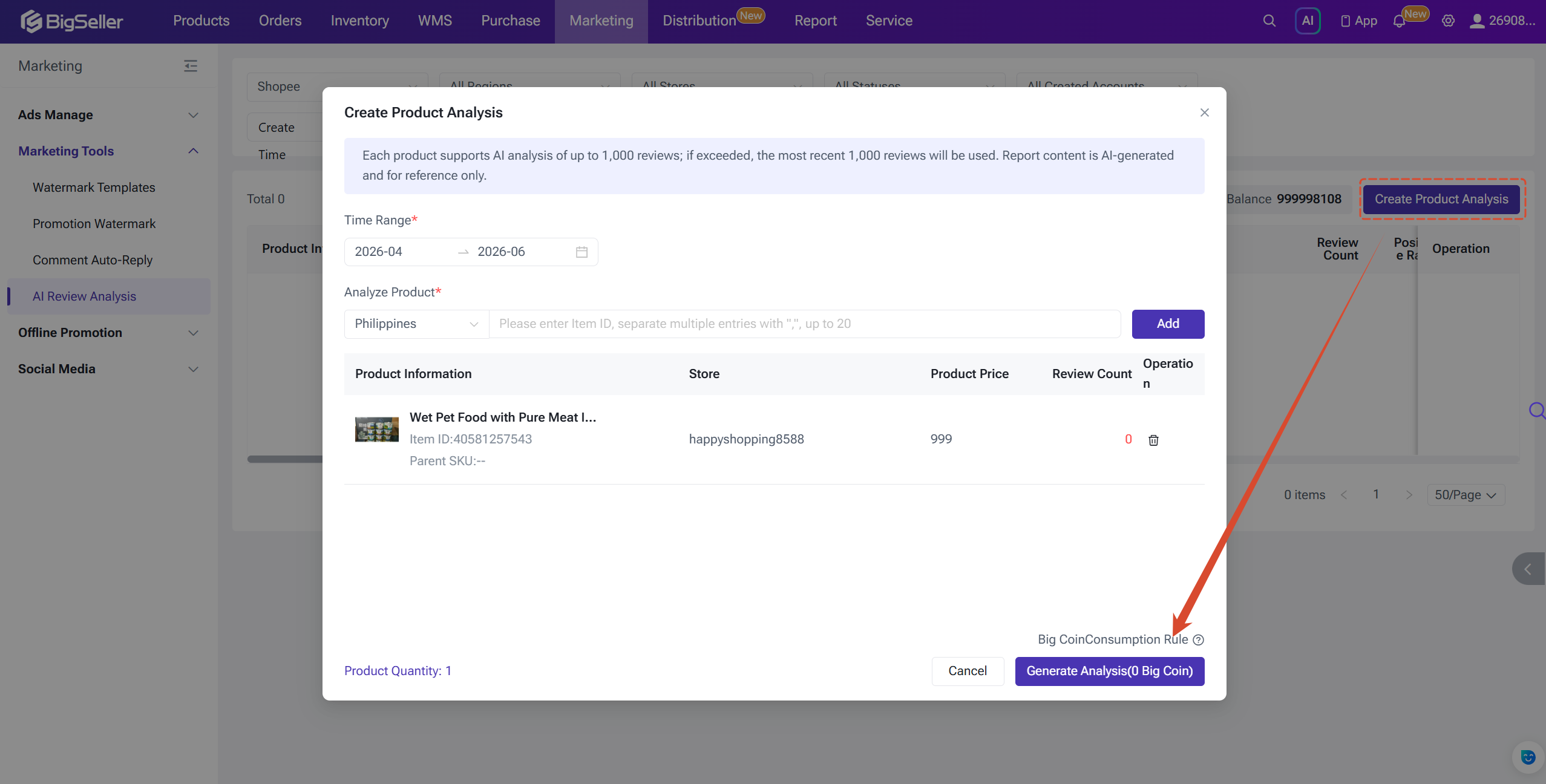
Click the [Create] button in the top-right corner. In the dialog, select your analysis time range (default is the past 3 months; up to 6 months supported), then enter Item IDs (Shopee) or Product IDs (Lazada) to add products — up to 20 per task. The system automatically retrieves each product's order count and review count for the selected time range. Products with zero reviews cannot be analyzed.
Pricing
Every 200 reviews per product costs 10 Big Coins, with any remainder rounded up to 10 BC. The maximum cost per product is 50 BC, covering up to 1,000 reviews. If a product has more than 1,000 reviews, the most recent 1,000 are used.
Creating an Analysis Task
Click the [Create] button in the top-right corner. In the dialog, select your analysis time range (default is the past 3 months; up to 6 months supported), then enter Item IDs (Shopee) or Product IDs (Lazada) to add products — up to 20 per task. The system automatically retrieves each product's order count and review count for the selected time range. Products with zero reviews cannot be analyzed.
Pricing
Every 200 reviews per product costs 10 Big Coins, with any remainder rounded up to 10 BC. The maximum cost per product is 50 BC, covering up to 1,000 reviews. If a product has more than 1,000 reviews, the most recent 1,000 are used.
Is this content helpful?
Thank you for your feedback. It drives us to provide better service.
Please contact us if the document can't answer your questions