What is Wallet Transaction?
Copy link & title
Update Time: 26 Feb 2026 12:17
BigSeller has launched the Wallet Transaction feature, which integrates wallet data from Shopee, TikTok, and Lazada. This feature records detailed transaction data from these three platforms, providing sellers with a cross-platform and cross-store "Financial Dashboard." It enables finance teams to quickly understand the actual earnings of store orders, further assisting in withdrawal reconciliation and capital chain monitoring.
Currently, the feature supports Shopee, Lazada, and TikTok. BigSeller also provides a General Template to help sellers view aggregated data across all platforms and stores.
Currently, the feature supports Shopee, Lazada, and TikTok. BigSeller also provides a General Template to help sellers view aggregated data across all platforms and stores.
💡 Important Notes:
- Update Frequency: Wallet data is automatically updated once a day. Users can also manually click "Sync" to get real-time updates.
- TikTok Limits: Aggregated statistics are currently not supported for TikTok.
- Wallet Balance: Only Shopee supports viewing the "Wallet Balance" directly.
- Transaction IDs: For store-level fees unrelated to specific orders, the Transaction ID may be blank.
- Permissions: Access is granted to the Administrator/Main Account by default. Sub-accounts must be granted permission manually.
1. General Template
Users can view transaction records for all stores across the three platforms in the General Template. It supports filtering and exporting data by platform, store, transaction type, cash flow, and time.
1) Filter Descriptions
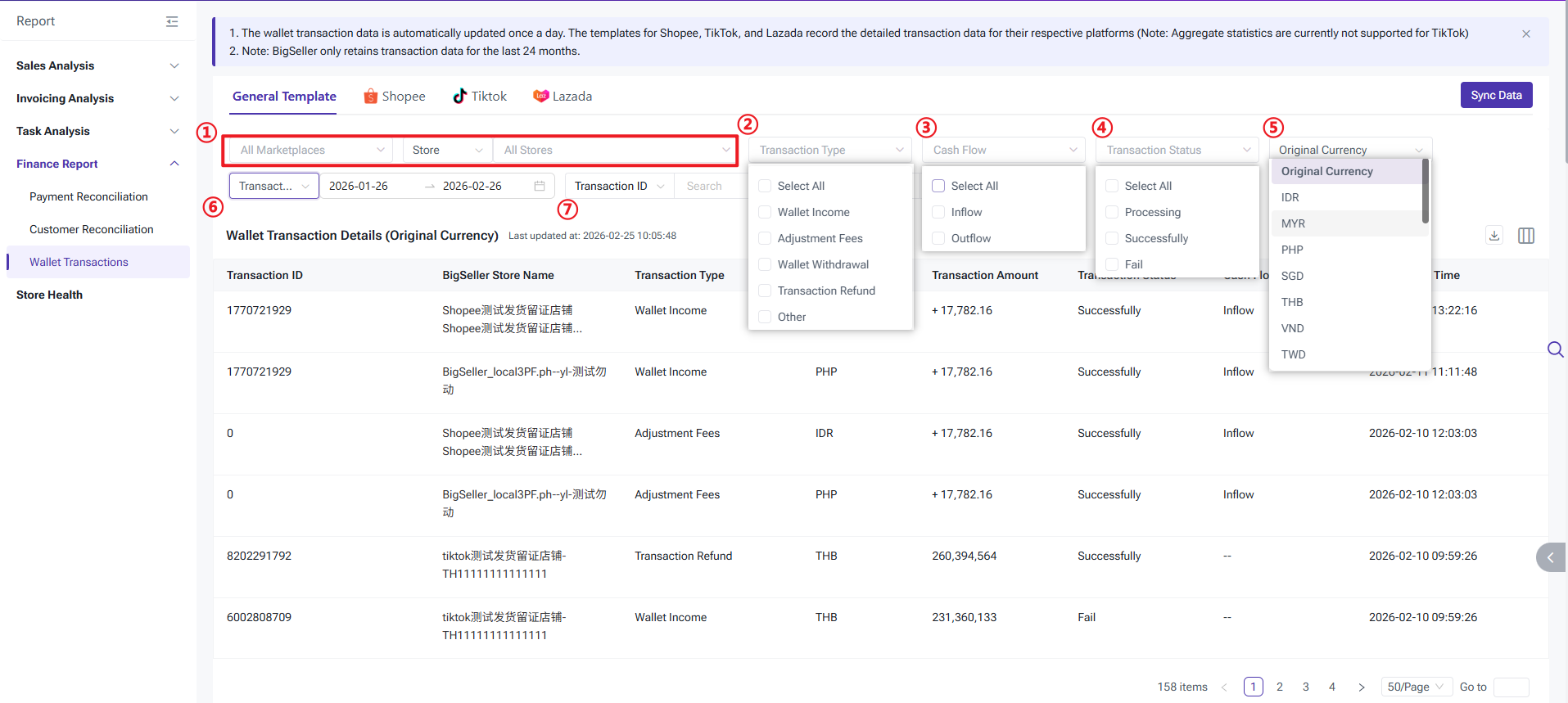
The General Template provides the following filters:
① Platform & Store: Filter by Marketplace (Shopee, TikTok, Lazada), Store Groups, or specific Stores.
② Transaction Type: Includes Wallet Income, Adjustment Fees, Wallet Withdrawal, Transaction Refund, and Others. (Types not explicitly listed are categorized as "Others").
③ Cash Flow: Inflow and Outflow.
④ Transaction Status: Processing, Successful, and Failed.
⑤ Original Currency: Defaults to the order's original currency. If switched to another currency, the system applies the Fixed Rate first; if no fixed rate is set, the Real-time Rate is used.
⑥ Transaction Time: The creation time of the transaction record.
⑦ Transaction ID: Supports fuzzy search by ID.
 2) Wallet Transaction Details (Displayed by the currency selected)
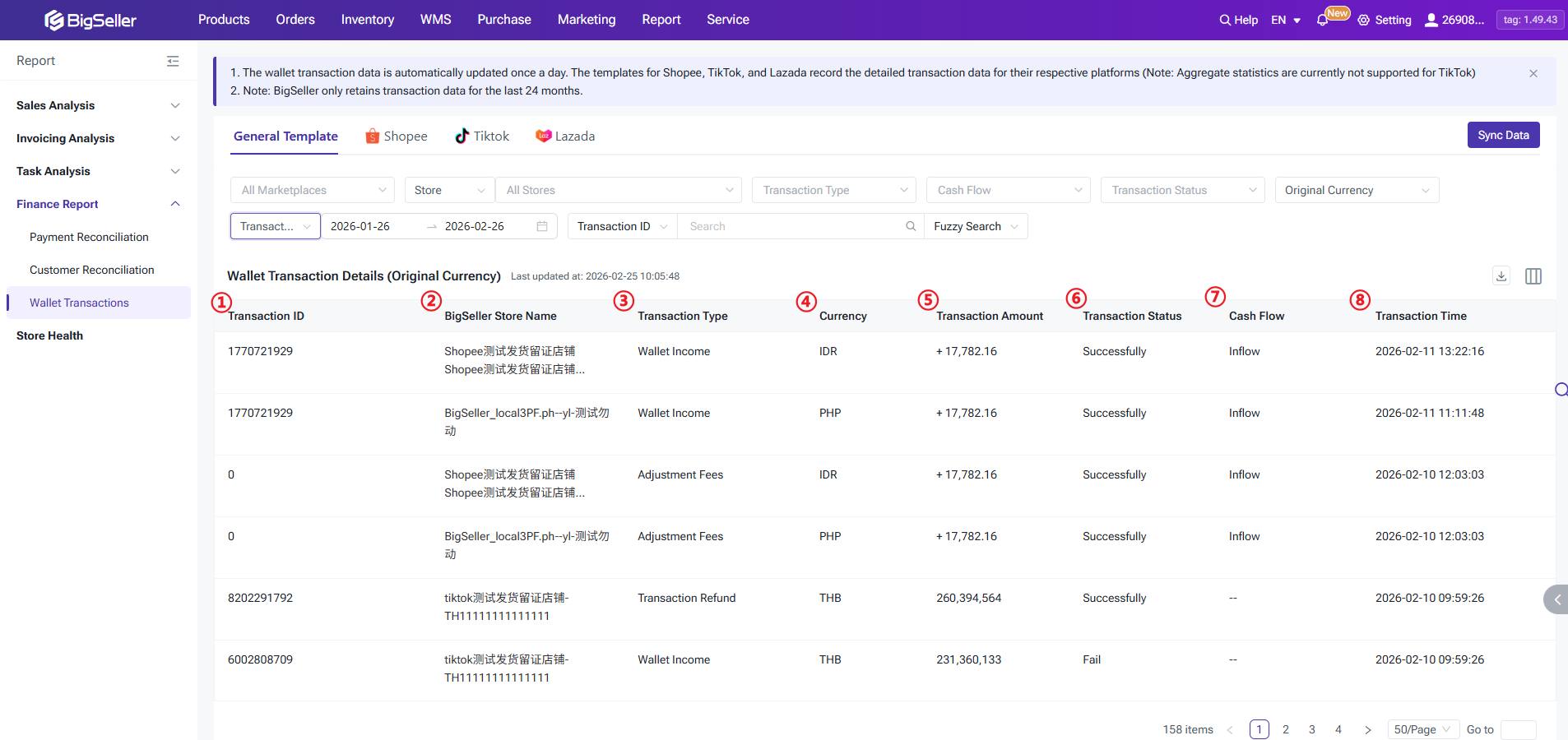
① Transaction ID: Retrieved directly from the Seller Center.
② BigSeller Store Name
③ Transaction Type
④ Currency: Shopee uses the site currency; TikTok & Lazada use the currency set in their respective Seller Centers.
⑤ Transaction Amount: The exact amount from the Seller Center (for Shopee, income is "+" and expenditure is "-").
⑥ Transaction Status
⑦ Cash Flow: Not supported for TikTok (displayed as "--").
⑧ Transaction Time
1) Filter Descriptions
The General Template provides the following filters:
① Platform & Store: Filter by Marketplace (Shopee, TikTok, Lazada), Store Groups, or specific Stores.
② Transaction Type: Includes Wallet Income, Adjustment Fees, Wallet Withdrawal, Transaction Refund, and Others. (Types not explicitly listed are categorized as "Others").
③ Cash Flow: Inflow and Outflow.
④ Transaction Status: Processing, Successful, and Failed.
⑤ Original Currency: Defaults to the order's original currency. If switched to another currency, the system applies the Fixed Rate first; if no fixed rate is set, the Real-time Rate is used.
⑥ Transaction Time: The creation time of the transaction record.
⑦ Transaction ID: Supports fuzzy search by ID.
2) Wallet Transaction Details (Displayed by the currency selected)① Transaction ID: Retrieved directly from the Seller Center.
② BigSeller Store Name
③ Transaction Type
④ Currency: Shopee uses the site currency; TikTok & Lazada use the currency set in their respective Seller Centers.
⑤ Transaction Amount: The exact amount from the Seller Center (for Shopee, income is "+" and expenditure is "-").
⑥ Transaction Status
⑦ Cash Flow: Not supported for TikTok (displayed as "--").
⑧ Transaction Time
2. Shopee Transactions
Transaction types are pulled directly from the Shopee Seller Center. This section supports both summary views and detailed data.
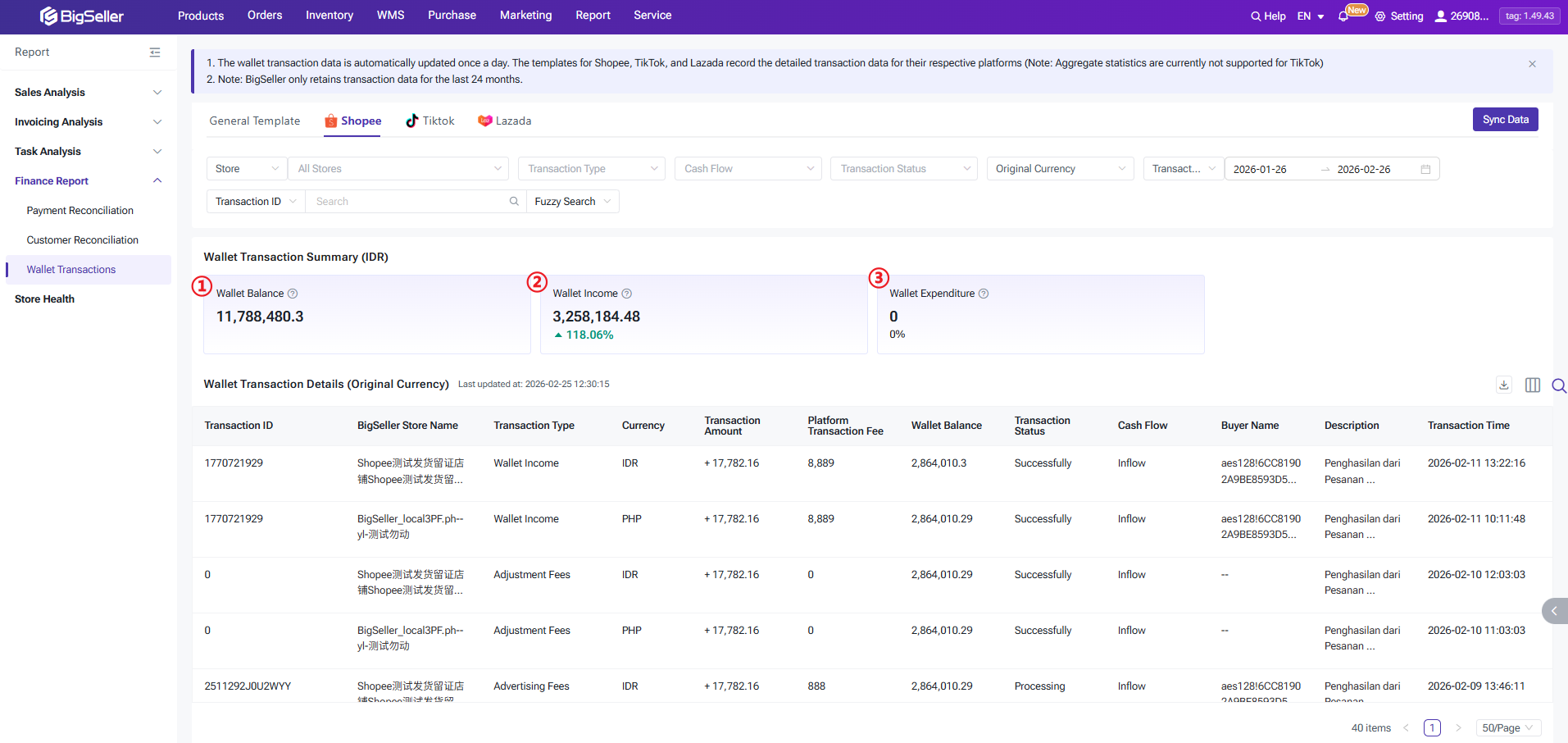
① Wallet Balance: Matches the "Wallet Balance" on the Shopee "My Balance" page.
② Wallet Income: Total funds inflow. The system calculates statistics based on the marketplace currency by default and supports Month-on-Month (MoM) comparison.
③ Wallet Expenditure: Total funds outflow. Calculated based on the marketplace currency by default and supports MoM comparison.
① Wallet Balance: Matches the "Wallet Balance" on the Shopee "My Balance" page.
② Wallet Income: Total funds inflow. The system calculates statistics based on the marketplace currency by default and supports Month-on-Month (MoM) comparison.
③ Wallet Expenditure: Total funds outflow. Calculated based on the marketplace currency by default and supports MoM comparison.
3. TikTok Transactions
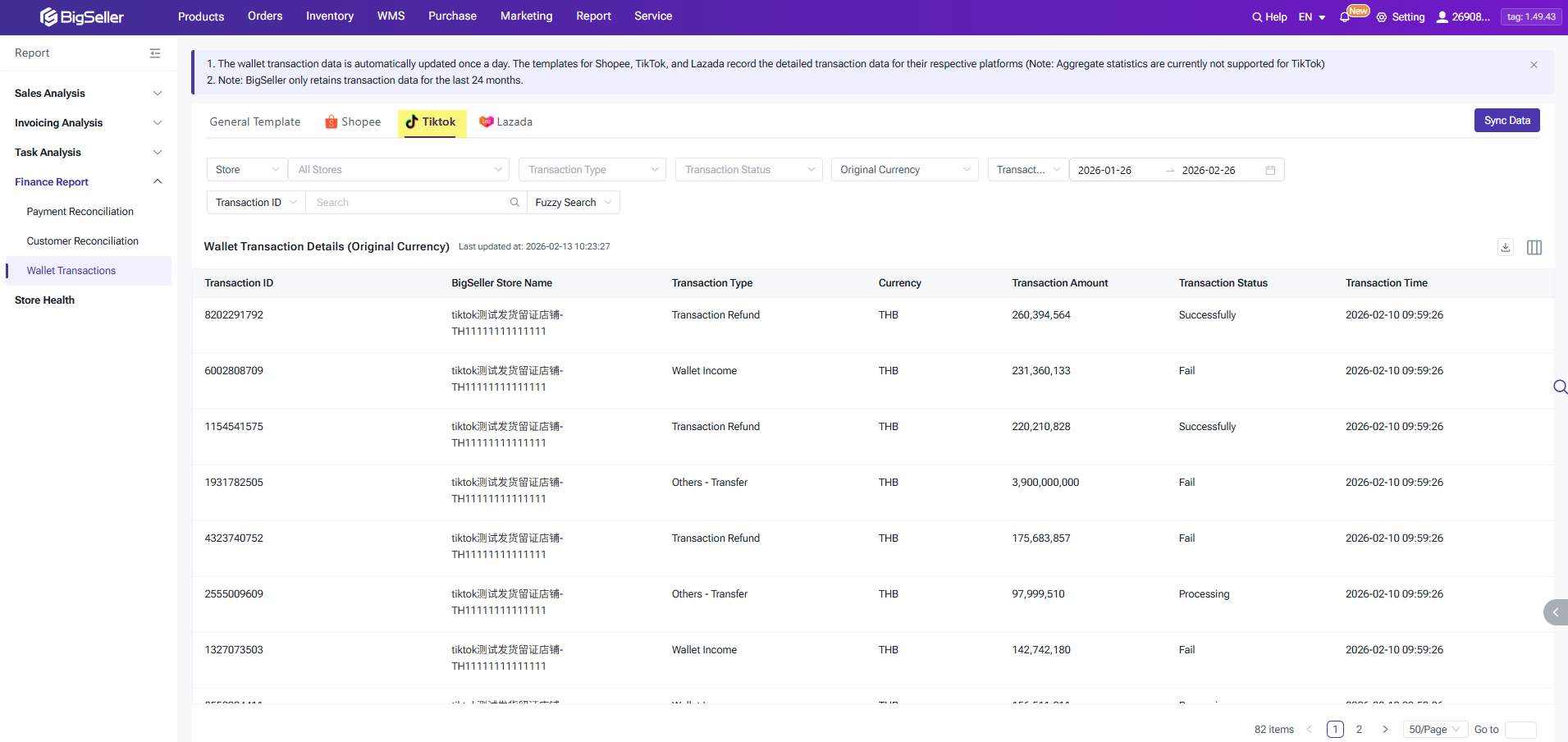
This section allows for centralized viewing of transaction details for all TikTok stores.
- Supported Types: Wallet Withdrawal, Wallet Income, Others - Transfer, and Transaction Refund.
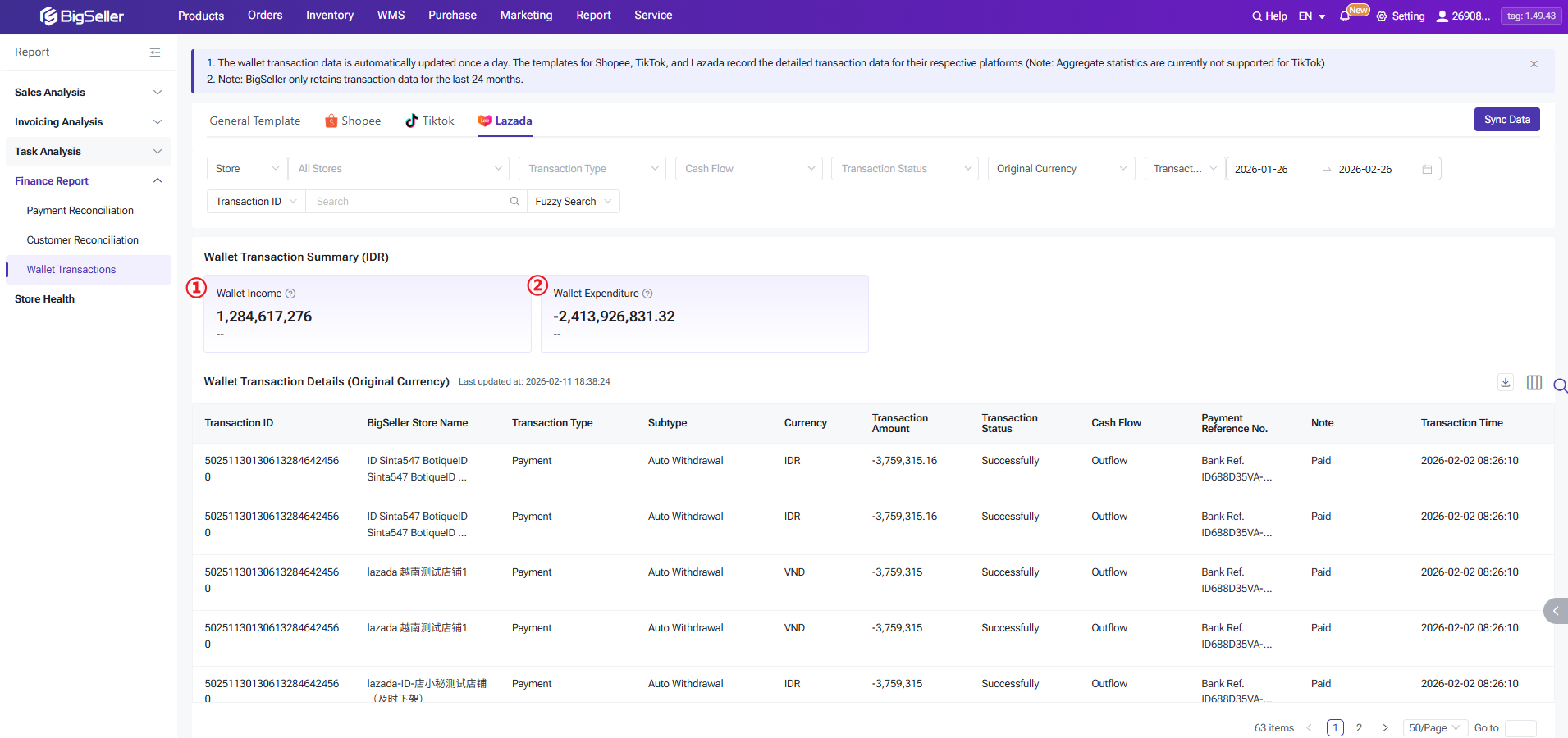
4. Lazada Transactions
Supports both summary views and detailed transaction data. Supported Types are: Wallet Income, Wallet Withdrawal, Payment, Penalty, Adjustment Fee, and Others.
① Wallet Income: Total funds inflow, calculated by marketplace currency.
② Wallet Expenditure: Total funds outflow, calculated by marketplace currency.
① Wallet Income: Total funds inflow, calculated by marketplace currency.
② Wallet Expenditure: Total funds outflow, calculated by marketplace currency.
Is this content helpful?
Thank you for your feedback. It drives us to provide better service.
Please contact us if the document can't answer your questions